
WLAN
These carrier settings are applicable when you select:
802.11ac as the PHY Specification
and VHT PPDU Format or VHT NDP Format as the Generation Mode
Number of Total Space Time Streams (Nsts,total)
Number of Transmit Chains (Ntx)
Quadrature Angle Adjustment for Waveform 1
I/Q Gain Balance for Waveform 1
Quadrature Angle Adjustment for Waveform 2
I/Q Gain Balance for Waveform 2
Quadrature Angle Adjustment for Waveform 3
I/Q Gain Balance for Waveform 3
Quadrature Angle Adjustment for Waveform 4
I/Q Gain Balance for Waveform 4
Quadrature Angle Adjustment for Waveform 5
I/Q Gain Balance for Waveform 5
Quadrature Angle Adjustment for Waveform 6
I/Q Gain Balance for Waveform 6
Quadrature Angle Adjustment for Waveform 7
I/Q Gain Balance for Waveform 7
Quadrature Angle Adjustment for Waveform 8
I/Q Gain Balance for Waveform 8
Quadrature Angle Adjustment Vector for Waveform 1
I/Q Gain Balance Vector for Waveform 1
Quadrature Angle Adjustment Vector for Waveform 2
I/Q Gain Balance Vector for Waveform 2
Quadrature Angle Adjustment Vector for Waveform 3
I/Q Gain Balance Vector for Waveform 3
Quadrature Angle Adjustment Vector for Waveform 4
I/Q Gain Balance Vector for Waveform 4
Quadrature Angle Adjustment Vector for Waveform 5
I/Q Gain Balance Vector for Waveform 5
Quadrature Angle Adjustment Vector for Waveform 6
I/Q Gain Balance Vector for Waveform 6
Quadrature Angle Adjustment Vector for Waveform 7
I/Q Gain Balance Vector for Waveform 7
Quadrature Angle Adjustment Vector for Waveform 8
I/Q Gain Balance Vector for Waveform 8
Number of Spatial Streams (Nss,u)
Number of Space Time Streams (Nsts,u)
Minimum MPDU Start Spacing in octets
Sequence Number Increment by Frames
B1: Supported Channel Width Set
B15: L-SIG TXOP Protection Support
Transmit Beamforming Capabilities
B2: Supported Channel Width Set B0
B3: Supported Channel Width Set B1
B13: Beamformee STS Capability B0
B14: Beamformee STS Capability B1
B15: Beamformee STS Capability B2
B16: Number Of Sounding Dimensions B0
B17: Number Of Sounding Dimensions B1
B18: Number Of Sounding Dimensions B2
B23: Maximum AMPDU Length Exponent B0
B24: Maximum AMPDU Length Exponent B1
B25: Maximum AMPDU Length Exponent B2
B26: VHT Link Adaptation Capable B0
B27: VHT Link Adaptation Capable B1
B28: Rx Antenna Pattern Consistency
B29: Tx Antenna Pattern Consistency
Determine whether the OFDM symbols adopt the short guard interval which is 400 ns. The regular guard interval is 800 ns.
|
SCPI Command |
[:SOURce]:RADio:WLAN:WAVeform:AC:VHT:SGINterval ON|OFF|1|0 [:SOURce]:RADio:WLAN:WAVeform:AC:VHT:SGINterval? |
|
SCPI Example |
|
|
Couplings |
|
|
Preset |
OFF |
|
State Saved |
Yes |
Set the initial state of the scrambler in decimal format, which is then turned into 7 bits to feed into the scrambler.
|
SCPI Command |
[:SOURce]:RADio:WLAN:WAVeform:AC:VHT:SCRambler:INIT <integer> [:SOURce]:RADio:WLAN:WAVeform:AC:VHT:SCRambler:INIT? |
|
SCPI Example |
|
|
Couplings |
|
|
Preset |
93 |
|
State Saved |
Yes |
|
Min |
|
|
Max |
|
Enable/disable space time block coding.
The Space Time Block Coding (STBC) encoder spreads constellation points from Nss spatial stream into Nsts space-time streams using a space-time block code. STBC is used only when Nss <= Nsts.
For each user, its Number of Space Time Streams is equal to its Number of Spatial Streams when the Space Time Block Coding is OFF. Otherwise, its Number of Space Time Streams is twice its Number of Spatial Streams when the Space Time Block Coding is ON. The default value of Space Time Block Coding is OFF. When a user attempts to turn it ON, the software checks whether this will result in the Number of Total Space Time Streams (Nsts,total) being greater than the Number of Transmit Chains (Ntx). If yes, Space Time Block Coding will remain OFF.
|
SCPI Command |
[:SOURce]:RADio:WLAN:WAVeform:AC:VHT:STBC ON|OFF|1|0 [:SOURce]:RADio:WLAN:WAVeform:AC:VHT:STBC? |
|
SCPI Example |
|
|
Couplings |
|
|
Preset |
OFF |
|
State Saved |
Yes |
Query only
Displays the total number of space time streams, which equals the sum of the Nsts of each user.
|
SCPI Command |
[:SOURce]:RADio:WLAN:WAVeform:AC:VHT:NSTS? |
|
SCPI Example |
|
|
Couplings |
|
|
Preset |
1 |
|
State Saved |
Yes |
|
Min |
|
|
Max |
|
Query only
Display the number of VHT-LTFs.
Table 1 Number of VHT-LTFs required for different numbers of space time streams
|
NSTS,total |
NVHTLTF |
|---|---|
|
1 |
1 |
|
2 |
2 |
|
3 |
4 |
|
4 |
4 |
|
5 |
6 |
|
6 |
6 |
|
7 |
8 |
|
8 |
8 |
|
SCPI Command |
[:SOURce]:RADio:WLAN:WAVeform:AC:VHT:NVHTltf? |
|
SCPI Example |
|
|
Couplings |
|
|
Preset |
1 |
|
State Saved |
Yes |
|
Min |
|
|
Max |
|
Set the number of transmit chains.
|
SCPI Command |
[:SOURce]:RADio:WLAN:WAVeform:AC:VHT:NTX <integer> [:SOURce]:RADio:WLAN:WAVeform:AC:VHT:NTX? |
|
SCPI Example |
|
|
Couplings |
|
|
Preset |
1 |
|
State Saved |
Yes |
|
Min |
|
|
Max |
|
Set an abbreviated indication of the intended recipients of the PSDU, which takes 9 bits.
|
SCPI Command |
[:SOURce]:RADio:WLAN:WAVeform:AC:VHT:PAID <integer> [:SOURce]:RADio:WLAN:WAVeform:AC:VHT:PAID? |
|
SCPI Example |
|
|
Couplings |
|
|
Preset |
256 |
|
State Saved |
Yes |
|
Min |
|
|
Max |
|
|
SCPI Command |
[:SOURce]:RADio:WLAN:WAVeform:AC:VHT:TRANsmission:MODE SINGle|MULTiple [:SOURce]:RADio:WLAN:WAVeform:AC:VHT:TRANsmission:MODE? |
|
SCPI Example |
|
|
Couplings |
|
|
Preset |
SINGle |
|
State Saved |
Yes |
Set the spatial mapping scheme.
|
SCPI Command |
[:SOURce]:RADio:WLAN:WAVeform:AC:VHT:SPATial:MAPPing:SCHeme DMAPping|SEXPansion|UDEFined|BEAM [:SOURce]:RADio:WLAN:WAVeform:AC:VHT:SPATial:MAPPing:SCHeme? |
|
SCPI Example |
|
|
Couplings |
|
|
Preset |
DMAPping |
|
State Saved |
Yes |
Set the contents of the spatial mapping matrix.
If the Spatial Mapping Scheme is Direct Mapping or Spatial Expansion, the contents of this matrix are pre-defined and can’t be edited.
If the Spatial Mapping Scheme is User Defined, you can edit the matrix. When the editing is done, the content of the matrix will be saved for generating the next waveform.
When you click the > button displayed with this setting, the Spatial Mapping Matrix dialog opens. Using this dialog, you can edit the matrix contents, save the matrix contents to a .txt file, or recall a previously saved .txt file for generating the next waveform.
|
SCPI Command |
[:SOURce]:RADio:WLAN:WAVeform:AC:VHT:SPATial:MAPPing [:SOURce]:RADio:WLAN:WAVeform:AC:VHT:SPATial:MAPPing? |
|
SCPI Example |
|
|
Couplings |
|
|
Preset |
1; |
|
State Saved |
Yes |
The Beamforming Matrix is a three-dimensional structure organized by Subcarrier, TX, and STS. But it is saved as a string.
To input this matrix as a string
The matrix represents Subcarrier × Tx × STS values where:
Subcarrier represents the number of subcarriers (e.g., 64)
Tx represents the number of transmit antennas (e.g., 4)
STS represents the number of space-time streams (e.g., 4)
Each subcarrier has a Tx × STS matrix where:
Rows = Tx (TX0, TX1, TX2, TX3)
Columns = STS (STS0, STS1, STS2, STS3)
String Format
Values are separated by commas (,) within a row.
Rows are separated by semicolons (;).
All rows for one subcarrier are grouped together.
Subcarriers are concatenated in sequence.
So for Tx = 4, STS = 4, each subcarrier block looks like:
v00,v01,v02,v03; // TX0 row
v10,v11,v12,v13; // TX1 row
v20,v21,v22,v23; // TX2 row
v30,v31,v32,v33; // TX3 row
For multiple subcarriers, repeat this block for each subcarrier without extra separators.
Example
TX=4, STS =4, for Subcarrier Index = 32 (shown in GUI): string value will be like:
0.5,0.5,0.5,0.5;0.5,0.5i,-0.5,-0.5i;0.5,-0.5,0.5,-0.5;0.5,-0.5i,-0.5,0.5i
If you have 64 subcarriers, repeat this pattern 64 times in one long string.
Save or Recall File
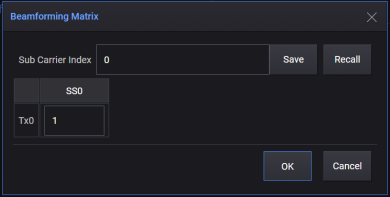
When you click the > button displayed with the Beamforming Matrix setting, the Beamforming Matrix dialog is displayed. Click Save in this dialog to save the Beamforming Matrix file with a .bfm, .csv, or .txt file extension. click Recall to open an existing Beamforming Matrix file (.bfm, .csv, or .txt).
|
SCPI Command |
[:SOURce]:RADio:WLAN:WAVeform:AC:VHT:BEAMforming:MATRix:VALue [:SOURce]:RADio:WLAN:WAVeform:AC:VHT:BEAMforming:MATRix:VALue? |
|
SCPI Example |
|
|
Couplings |
|
|
Preset |
"1" |
|
State Saved |
Yes |
Select the IQ impairment mode. Each mode has a unique pair of impairment adjustments.
Constant - IQ impairment is independent of frequency.
Frequency Dependent - IQ impairment is a function of frequency with vector impairment adjustments applied to subcarriers.
|
SCPI Command |
[:SOURce]:RADio:WLAN:WAVeform:AC:VHT:IQIMpair:MODE CONStant|FDEPendant [:SOURce]:RADio:WLAN:WAVeform:AC:VHT:IQIMpair:MODE? |
|
SCPI Example |
|
|
Couplings |
|
|
Preset |
CONStant |
|
State Saved |
Yes |
Add quadrature skew impairment (-90 to + 90 degrees) to the generated waveform for the specific signal generator. This affects the waveform data so it applies to both RF and baseband I/Q outputs.
The baseband Quadrature Angle (angle) and the baseband IQ Gain (gain) values are used to modify the output I and Q data according to the following equations:
Real (output) = Real (input) - Gs * Imag (input)
Imag (output) = Gc * Imag (input)
where:
Gs = Gain * sin (angle) and
Gc = Gain * cos (angle)
|
SCPI Command |
[:SOURce]:RADio:WLAN:WAVeform:AC:VHT:QUAD:ANG1 <real> [:SOURce]:RADio:WLAN:WAVeform:AC:VHT:QUAD:ANG1? |
|
SCPI Example |
|
|
Couplings |
|
|
Preset |
0 |
|
State Saved |
Yes |
|
Min |
|
|
Max |
|
Add quadrature gain impairment (-10 dB to 10 dB) to the generated waveform for the specific signal generator. This affects the waveform data so it applies to both the RF and baseband I/Q outputs.
|
SCPI Command |
[:SOURce]:RADio:WLAN:WAVeform:AC:VHT:IQ:GB1 <real> [:SOURce]:RADio:WLAN:WAVeform:AC:VHT:IQ:GB1? |
|
SCPI Example |
|
|
Couplings |
|
|
Preset |
0 |
|
State Saved |
Yes |
|
Min |
|
|
Max |
|
For description, refer to Quadrature Angle Adjustment for Waveform 1.
|
SCPI Command |
[:SOURce]:RADio:WLAN:WAVeform:AC:VHT:QUAD:ANG2 <real> [:SOURce]:RADio:WLAN:WAVeform:AC:VHT:QUAD:ANG2? |
|
SCPI Example |
|
|
Couplings |
|
|
Preset |
0 |
|
State Saved |
Yes |
|
Min |
|
|
Max |
|
For description, refer to I/Q Gain Balance for Waveform 1.
|
SCPI Command |
[:SOURce]:RADio:WLAN:WAVeform:AC:VHT:IQ:GB2 <real> [:SOURce]:RADio:WLAN:WAVeform:AC:VHT:IQ:GB2? |
|
SCPI Example |
|
|
Couplings |
|
|
Preset |
0 |
|
State Saved |
Yes |
|
Min |
|
|
Max |
|
For description, refer to Quadrature Angle Adjustment for Waveform 1.
|
SCPI Command |
[:SOURce]:RADio:WLAN:WAVeform:AC:VHT:QUAD:ANG3 <real> [:SOURce]:RADio:WLAN:WAVeform:AC:VHT:QUAD:ANG3? |
|
SCPI Example |
|
|
Couplings |
|
|
Preset |
0 |
|
State Saved |
Yes |
|
Min |
|
|
Max |
|
For description, refer to I/Q Gain Balance for Waveform 1.
|
SCPI Command |
[:SOURce]:RADio:WLAN:WAVeform:AC:VHT:IQ:GB3 <real> [:SOURce]:RADio:WLAN:WAVeform:AC:VHT:IQ:GB3? |
|
SCPI Example |
|
|
Couplings |
|
|
Preset |
0 |
|
State Saved |
Yes |
|
Min |
|
|
Max |
|
For description, refer to Quadrature Angle Adjustment for Waveform 1.
|
SCPI Command |
[:SOURce]:RADio:WLAN:WAVeform:AC:VHT:QUAD:ANG4 <real> [:SOURce]:RADio:WLAN:WAVeform:AC:VHT:QUAD:ANG4? |
|
SCPI Example |
|
|
Couplings |
|
|
Preset |
0 |
|
State Saved |
Yes |
|
Min |
|
|
Max |
|
For description, refer to I/Q Gain Balance for Waveform 1.
|
SCPI Command |
[:SOURce]:RADio:WLAN:WAVeform:AC:VHT:IQ:GB4 <real> [:SOURce]:RADio:WLAN:WAVeform:AC:VHT:IQ:GB4? |
|
SCPI Example |
|
|
Couplings |
|
|
Preset |
0 |
|
State Saved |
Yes |
|
Min |
|
|
Max |
|
For description, refer to Quadrature Angle Adjustment for Waveform 1.
|
SCPI Command |
[:SOURce]:RADio:WLAN:WAVeform:AC:VHT:QUAD:ANG5 <real> [:SOURce]:RADio:WLAN:WAVeform:AC:VHT:QUAD:ANG5? |
|
SCPI Example |
|
|
Couplings |
|
|
Preset |
0 |
|
State Saved |
Yes |
|
Min |
|
|
Max |
|
For description, refer to I/Q Gain Balance for Waveform 1.
|
SCPI Command |
[:SOURce]:RADio:WLAN:WAVeform:AC:VHT:IQ:GB5 <real> [:SOURce]:RADio:WLAN:WAVeform:AC:VHT:IQ:GB5? |
|
SCPI Example |
|
|
Couplings |
|
|
Preset |
0 |
|
State Saved |
Yes |
|
Min |
|
|
Max |
|
For description, refer to Quadrature Angle Adjustment for Waveform 1.
|
SCPI Command |
[:SOURce]:RADio:WLAN:WAVeform:AC:VHT:QUAD:ANG6 <real> [:SOURce]:RADio:WLAN:WAVeform:AC:VHT:QUAD:ANG6? |
|
SCPI Example |
|
|
Couplings |
|
|
Preset |
0 |
|
State Saved |
Yes |
|
Min |
|
|
Max |
|
For description, refer to I/Q Gain Balance for Waveform 1.
|
SCPI Command |
[:SOURce]:RADio:WLAN:WAVeform:AC:VHT:IQ:GB6 <real> [:SOURce]:RADio:WLAN:WAVeform:AC:VHT:IQ:GB6? |
|
SCPI Example |
|
|
Couplings |
|
|
Preset |
0 |
|
State Saved |
Yes |
|
Min |
|
|
Max |
|
For description, refer to Quadrature Angle Adjustment for Waveform 1.
|
SCPI Command |
[:SOURce]:RADio:WLAN:WAVeform:AC:VHT:QUAD:ANG7 <real> [:SOURce]:RADio:WLAN:WAVeform:AC:VHT:QUAD:ANG7? |
|
SCPI Example |
|
|
Couplings |
|
|
Preset |
0 |
|
State Saved |
Yes |
|
Min |
|
|
Max |
|
For description, refer to I/Q Gain Balance for Waveform 1.
|
SCPI Command |
[:SOURce]:RADio:WLAN:WAVeform:AC:VHT:IQ:GB7 <real> [:SOURce]:RADio:WLAN:WAVeform:AC:VHT:IQ:GB7? |
|
SCPI Example |
|
|
Couplings |
|
|
Preset |
0 |
|
State Saved |
Yes |
|
Min |
|
|
Max |
|
For description, refer to Quadrature Angle Adjustment for Waveform 1.
|
SCPI Command |
[:SOURce]:RADio:WLAN:WAVeform:AC:VHT:QUAD:ANG8 <real> [:SOURce]:RADio:WLAN:WAVeform:AC:VHT:QUAD:ANG8? |
|
SCPI Example |
|
|
Couplings |
|
|
Preset |
0 |
|
State Saved |
Yes |
|
Min |
|
|
Max |
|
For description, refer to I/Q Gain Balance for Waveform 1.
|
SCPI Command |
[:SOURce]:RADio:WLAN:WAVeform:AC:VHT:IQ:GB8 <real> [:SOURce]:RADio:WLAN:WAVeform:AC:VHT:IQ:GB8? |
|
SCPI Example |
|
|
Couplings |
|
|
Preset |
0 |
|
State Saved |
Yes |
|
Min |
|
|
Max |
|
This is a vector with a maximum length of 512. Click the > button displayed with this setting to open the dialog where you can specify the quadrature angle for every subcarrier in the OFDM signal. ‘n’ specifies the index of the antenna.
|
SCPI Command |
[:SOURce]:RADio:WLAN:WAVeform:AC:VHT:QUAD:ANG:VECT1 [:SOURce]:RADio:WLAN:WAVeform:AC:VHT:QUAD:ANG:VECT1? |
|
SCPI Example |
|
|
Couplings |
|
|
Preset |
"0,0,0,0,0,0,0,0,0,0,0,0,0,0,0,0,0,0,0,0,0,0,0,0,0,0,0,0,0,0,0,0,0,0,0,0,0,0,0,0,0,0,0,0,0,0,0,0,0,0,0,0,0,0,0,0,0,0,0,0,0,0,0,0,0,0,0,0,0,0,0,0,0,0,0,0,0,0,0,0,0,0,0,0,0,0,0,0,0,0,0,0,0,0,0,0,0,0,0,0,0,0,0,0,0,0,0,0,0,0,0,0,0,0,0,0,0,0,0,0,0,0,0,0,0,0,0,0,0,0,0,0,0,0,0,0,0,0,0,0,0,0,0,0,0,0,0,0,0,0,0,0,0,0,0,0,0,0,0,0,0,0,0,0,0,0,0,0,0,0,0,0,0,0,0,0,0,0,0,0,0,0,0,0,0,0,0,0,0,0,0,0,0,0,0,0,0,0,0,0,0,0,0,0,0,0,0,0,0,0,0,0,0,0,0,0,0,0,0,0,0,0,0,0,0,0,0,0,0,0,0,0,0,0,0,0,0,0,0,0,0,0,0,0,0,0,0,0,0,0,0,0,0,0,0,0,0,0,0,0,0,0,0,0,0,0,0,0,0,0,0,0,0,0,0,0,0,0,0,0,0,0,0,0,0,0,0,0,0,0,0,0,0,0,0,0,0,0,0,0,0,0,0,0,0,0,0,0,0,0,0,0,0,0,0,0,0,0,0,0,0,0,0,0,0,0,0,0,0,0,0,0,0,0,0,0,0,0,0,0,0,0,0,0,0,0,0,0,0,0,0,0,0,0,0,0,0,0,0,0,0,0,0,0,0,0,0,0,0,0,0,0,0,0,0,0,0,0,0,0,0,0,0,0,0,0,0,0,0,0,0,0,0,0,0,0,0,0,0,0,0,0,0,0,0,0,0,0,0,0,0,0,0,0,0,0,0,0,0,0,0,0,0,0,0,0,0,0,0,0,0,0,0,0,0,0,0,0,0,0,0,0,0,0,0,0,0,0,0,0,0,0,0,0,0,0,0,0,0,0,0,0,0,0,0,0,0,0,0,0,0,0,0,0,0,0,0,0,0,0,0,0,0,0,0,0,0,0,0,0,0,0,0,0,0,0,0,0,0,0,0,0,0,0,0,0,0,0,0,0,0,0,0,0,0,0,0,0,0,0,0,0,0,0,0,0,0,0,0,0,0,0,0,0,0,0,0,0,0,0,0,0,0,0,0,0,0,0,0,0,0,0," |
|
State Saved |
Yes |
This is a vector with a maximum length of 512. Click the > button displayed with this setting to open the dialog where you can specify the in-phase gain for every subcarrier in the OFDM signal. ‘n’ specifies the index of the antenna.
|
SCPI Command |
[:SOURce]:RADio:WLAN:WAVeform:AC:VHT:IQ:GB:VECT1 [:SOURce]:RADio:WLAN:WAVeform:AC:VHT:IQ:GB:VECT1? |
|
SCPI Example |
|
|
Couplings |
|
|
Preset |
"0,0,0,0,0,0,0,0,0,0,0,0,0,0,0,0,0,0,0,0,0,0,0,0,0,0,0,0,0,0,0,0,0,0,0,0,0,0,0,0,0,0,0,0,0,0,0,0,0,0,0,0,0,0,0,0,0,0,0,0,0,0,0,0,0,0,0,0,0,0,0,0,0,0,0,0,0,0,0,0,0,0,0,0,0,0,0,0,0,0,0,0,0,0,0,0,0,0,0,0,0,0,0,0,0,0,0,0,0,0,0,0,0,0,0,0,0,0,0,0,0,0,0,0,0,0,0,0,0,0,0,0,0,0,0,0,0,0,0,0,0,0,0,0,0,0,0,0,0,0,0,0,0,0,0,0,0,0,0,0,0,0,0,0,0,0,0,0,0,0,0,0,0,0,0,0,0,0,0,0,0,0,0,0,0,0,0,0,0,0,0,0,0,0,0,0,0,0,0,0,0,0,0,0,0,0,0,0,0,0,0,0,0,0,0,0,0,0,0,0,0,0,0,0,0,0,0,0,0,0,0,0,0,0,0,0,0,0,0,0,0,0,0,0,0,0,0,0,0,0,0,0,0,0,0,0,0,0,0,0,0,0,0,0,0,0,0,0,0,0,0,0,0,0,0,0,0,0,0,0,0,0,0,0,0,0,0,0,0,0,0,0,0,0,0,0,0,0,0,0,0,0,0,0,0,0,0,0,0,0,0,0,0,0,0,0,0,0,0,0,0,0,0,0,0,0,0,0,0,0,0,0,0,0,0,0,0,0,0,0,0,0,0,0,0,0,0,0,0,0,0,0,0,0,0,0,0,0,0,0,0,0,0,0,0,0,0,0,0,0,0,0,0,0,0,0,0,0,0,0,0,0,0,0,0,0,0,0,0,0,0,0,0,0,0,0,0,0,0,0,0,0,0,0,0,0,0,0,0,0,0,0,0,0,0,0,0,0,0,0,0,0,0,0,0,0,0,0,0,0,0,0,0,0,0,0,0,0,0,0,0,0,0,0,0,0,0,0,0,0,0,0,0,0,0,0,0,0,0,0,0,0,0,0,0,0,0,0,0,0,0,0,0,0,0,0,0,0,0,0,0,0,0,0,0,0,0,0,0,0,0,0,0,0,0,0,0,0,0,0,0,0,0,0,0,0,0,0,0,0,0,0,0,0,0,0,0,0,0,0,0,0,0,0,0,0,0,0,0,0,0,0,0,0,0,0,0,0,0,0,0,0,0,0,0,0,0,0,0,0,0,0,"
|
|
State Saved |
Yes |
For description, refer to Quadrature Angle Adjustment Vector for Waveform 1.
|
SCPI Command |
[:SOURce]:RADio:WLAN:WAVeform:AC:VHT:QUAD:ANG:VECT2 [:SOURce]:RADio:WLAN:WAVeform:AC:VHT:QUAD:ANG:VECT2? |
|
SCPI Example |
|
|
Couplings |
|
|
Preset |
"0,0,0,0,0,0,0,0,0,0,0,0,0,0,0,0,0,0,0,0,0,0,0,0,0,0,0,0,0,0,0,0,0,0,0,0,0,0,0,0,0,0,0,0,0,0,0,0,0,0,0,0,0,0,0,0,0,0,0,0,0,0,0,0,0,0,0,0,0,0,0,0,0,0,0,0,0,0,0,0,0,0,0,0,0,0,0,0,0,0,0,0,0,0,0,0,0,0,0,0,0,0,0,0,0,0,0,0,0,0,0,0,0,0,0,0,0,0,0,0,0,0,0,0,0,0,0,0,0,0,0,0,0,0,0,0,0,0,0,0,0,0,0,0,0,0,0,0,0,0,0,0,0,0,0,0,0,0,0,0,0,0,0,0,0,0,0,0,0,0,0,0,0,0,0,0,0,0,0,0,0,0,0,0,0,0,0,0,0,0,0,0,0,0,0,0,0,0,0,0,0,0,0,0,0,0,0,0,0,0,0,0,0,0,0,0,0,0,0,0,0,0,0,0,0,0,0,0,0,0,0,0,0,0,0,0,0,0,0,0,0,0,0,0,0,0,0,0,0,0,0,0,0,0,0,0,0,0,0,0,0,0,0,0,0,0,0,0,0,0,0,0,0,0,0,0,0,0,0,0,0,0,0,0,0,0,0,0,0,0,0,0,0,0,0,0,0,0,0,0,0,0,0,0,0,0,0,0,0,0,0,0,0,0,0,0,0,0,0,0,0,0,0,0,0,0,0,0,0,0,0,0,0,0,0,0,0,0,0,0,0,0,0,0,0,0,0,0,0,0,0,0,0,0,0,0,0,0,0,0,0,0,0,0,0,0,0,0,0,0,0,0,0,0,0,0,0,0,0,0,0,0,0,0,0,0,0,0,0,0,0,0,0,0,0,0,0,0,0,0,0,0,0,0,0,0,0,0,0,0,0,0,0,0,0,0,0,0,0,0,0,0,0,0,0,0,0,0,0,0,0,0,0,0,0,0,0,0,0,0,0,0,0,0,0,0,0,0,0,0,0,0,0,0,0,0,0,0,0,0,0,0,0,0,0,0,0,0,0,0,0,0,0,0,0,0,0,0,0,0,0,0,0,0,0,0,0,0,0,0,0,0,0,0,0,0,0,0,0,0,0,0,0,0,0,0,0,0,0,0,0,0,0,0,0,0,0,0,0,0,0,0,0,0,0,0,0,0,0,0,0,0,0,0,0,0,0,0,0,0,0,0,0,0,0,0,0,0,0,0,0,0, " |
|
State Saved |
Yes |
For description, refer to I/Q Gain Balance Vector for Waveform 1.
|
SCPI Command |
[:SOURce]:RADio:WLAN:WAVeform:AC:VHT:IQ:GB:VECT2 [:SOURce]:RADio:WLAN:WAVeform:AC:VHT:IQ:GB:VECT2? |
|
SCPI Example |
|
|
Couplings |
|
|
Preset |
"0,0,0,0,0,0,0,0,0,0,0,0,0,0,0,0,0,0,0,0,0,0,0,0,0,0,0,0,0,0,0,0,0,0,0,0,0,0,0,0,0,0,0,0,0,0,0,0,0,0,0,0,0,0,0,0,0,0,0,0,0,0,0,0,0,0,0,0,0,0,0,0,0,0,0,0,0,0,0,0,0,0,0,0,0,0,0,0,0,0,0,0,0,0,0,0,0,0,0,0,0,0,0,0,0,0,0,0,0,0,0,0,0,0,0,0,0,0,0,0,0,0,0,0,0,0,0,0,0,0,0,0,0,0,0,0,0,0,0,0,0,0,0,0,0,0,0,0,0,0,0,0,0,0,0,0,0,0,0,0,0,0,0,0,0,0,0,0,0,0,0,0,0,0,0,0,0,0,0,0,0,0,0,0,0,0,0,0,0,0,0,0,0,0,0,0,0,0,0,0,0,0,0,0,0,0,0,0,0,0,0,0,0,0,0,0,0,0,0,0,0,0,0,0,0,0,0,0,0,0,0,0,0,0,0,0,0,0,0,0,0,0,0,0,0,0,0,0,0,0,0,0,0,0,0,0,0,0,0,0,0,0,0,0,0,0,0,0,0,0,0,0,0,0,0,0,0,0,0,0,0,0,0,0,0,0,0,0,0,0,0,0,0,0,0,0,0,0,0,0,0,0,0,0,0,0,0,0,0,0,0,0,0,0,0,0,0,0,0,0,0,0,0,0,0,0,0,0,0,0,0,0,0,0,0,0,0,0,0,0,0,0,0,0,0,0,0,0,0,0,0,0,0,0,0,0,0,0,0,0,0,0,0,0,0,0,0,0,0,0,0,0,0,0,0,0,0,0,0,0,0,0,0,0,0,0,0,0,0,0,0,0,0,0,0,0,0,0,0,0,0,0,0,0,0,0,0,0,0,0,0,0,0,0,0,0,0,0,0,0,0,0,0,0,0,0,0,0,0,0,0,0,0,0,0,0,0,0,0,0,0,0,0,0,0,0,0,0,0,0,0,0,0,0,0,0,0,0,0,0,0,0,0,0,0,0,0,0,0,0,0,0,0,0,0,0,0,0,0,0,0,0,0,0,0,0,0,0,0,0,0,0,0,0,0,0,0,0,0,0,0,0,0,0,0,0,0,0,0,0,0,0,0,0,0,0,0,0,0,0,0,0,0,0,0,0,0,0,0,0,0,0,0,0,0,0,0,0,0,0,0,0,0,0,0,0,0,0,0,0,0,0, " |
|
State Saved |
Yes |
For description, refer to Quadrature Angle Adjustment Vector for Waveform 1.
|
SCPI Command |
[:SOURce]:RADio:WLAN:WAVeform:AC:VHT:QUAD:ANG:VECT3 [:SOURce]:RADio:WLAN:WAVeform:AC:VHT:QUAD:ANG:VECT3? |
|
SCPI Example |
|
|
Couplings |
|
|
Preset |
"0,0,0,0,0,0,0,0,0,0,0,0,0,0,0,0,0,0,0,0,0,0,0,0,0,0,0,0,0,0,0,0,0,0,0,0,0,0,0,0,0,0,0,0,0,0,0,0,0,0,0,0,0,0,0,0,0,0,0,0,0,0,0,0,0,0,0,0,0,0,0,0,0,0,0,0,0,0,0,0,0,0,0,0,0,0,0,0,0,0,0,0,0,0,0,0,0,0,0,0,0,0,0,0,0,0,0,0,0,0,0,0,0,0,0,0,0,0,0,0,0,0,0,0,0,0,0,0,0,0,0,0,0,0,0,0,0,0,0,0,0,0,0,0,0,0,0,0,0,0,0,0,0,0,0,0,0,0,0,0,0,0,0,0,0,0,0,0,0,0,0,0,0,0,0,0,0,0,0,0,0,0,0,0,0,0,0,0,0,0,0,0,0,0,0,0,0,0,0,0,0,0,0,0,0,0,0,0,0,0,0,0,0,0,0,0,0,0,0,0,0,0,0,0,0,0,0,0,0,0,0,0,0,0,0,0,0,0,0,0,0,0,0,0,0,0,0,0,0,0,0,0,0,0,0,0,0,0,0,0,0,0,0,0,0,0,0,0,0,0,0,0,0,0,0,0,0,0,0,0,0,0,0,0,0,0,0,0,0,0,0,0,0,0,0,0,0,0,0,0,0,0,0,0,0,0,0,0,0,0,0,0,0,0,0,0,0,0,0,0,0,0,0,0,0,0,0,0,0,0,0,0,0,0,0,0,0,0,0,0,0,0,0,0,0,0,0,0,0,0,0,0,0,0,0,0,0,0,0,0,0,0,0,0,0,0,0,0,0,0,0,0,0,0,0,0,0,0,0,0,0,0,0,0,0,0,0,0,0,0,0,0,0,0,0,0,0,0,0,0,0,0,0,0,0,0,0,0,0,0,0,0,0,0,0,0,0,0,0,0,0,0,0,0,0,0,0,0,0,0,0,0,0,0,0,0,0,0,0,0,0,0,0,0,0,0,0,0,0,0,0,0,0,0,0,0,0,0,0,0,0,0,0,0,0,0,0,0,0,0,0,0,0,0,0,0,0,0,0,0,0,0,0,0,0,0,0,0,0,0,0,0,0,0,0,0,0,0,0,0,0,0,0,0,0,0,0,0,0,0,0,0,0,0,0,0,0,0,0,0,0,0,0,0,0,0,0,0,0,0,0,0,0,0,0,0,0,0,0,0,0,0,0,0,0,0,0,0,0,0,0,0, " |
|
State Saved |
Yes |
For description, refer to I/Q Gain Balance Vector for Waveform 1.
|
SCPI Command |
[:SOURce]:RADio:WLAN:WAVeform:AC:VHT:IQ:GB:VECT3 [:SOURce]:RADio:WLAN:WAVeform:AC:VHT:IQ:GB:VECT3? |
|
SCPI Example |
|
|
Couplings |
|
|
Preset |
"0,0,0,0,0,0,0,0,0,0,0,0,0,0,0,0,0,0,0,0,0,0,0,0,0,0,0,0,0,0,0,0,0,0,0,0,0,0,0,0,0,0,0,0,0,0,0,0,0,0,0,0,0,0,0,0,0,0,0,0,0,0,0,0,0,0,0,0,0,0,0,0,0,0,0,0,0,0,0,0,0,0,0,0,0,0,0,0,0,0,0,0,0,0,0,0,0,0,0,0,0,0,0,0,0,0,0,0,0,0,0,0,0,0,0,0,0,0,0,0,0,0,0,0,0,0,0,0,0,0,0,0,0,0,0,0,0,0,0,0,0,0,0,0,0,0,0,0,0,0,0,0,0,0,0,0,0,0,0,0,0,0,0,0,0,0,0,0,0,0,0,0,0,0,0,0,0,0,0,0,0,0,0,0,0,0,0,0,0,0,0,0,0,0,0,0,0,0,0,0,0,0,0,0,0,0,0,0,0,0,0,0,0,0,0,0,0,0,0,0,0,0,0,0,0,0,0,0,0,0,0,0,0,0,0,0,0,0,0,0,0,0,0,0,0,0,0,0,0,0,0,0,0,0,0,0,0,0,0,0,0,0,0,0,0,0,0,0,0,0,0,0,0,0,0,0,0,0,0,0,0,0,0,0,0,0,0,0,0,0,0,0,0,0,0,0,0,0,0,0,0,0,0,0,0,0,0,0,0,0,0,0,0,0,0,0,0,0,0,0,0,0,0,0,0,0,0,0,0,0,0,0,0,0,0,0,0,0,0,0,0,0,0,0,0,0,0,0,0,0,0,0,0,0,0,0,0,0,0,0,0,0,0,0,0,0,0,0,0,0,0,0,0,0,0,0,0,0,0,0,0,0,0,0,0,0,0,0,0,0,0,0,0,0,0,0,0,0,0,0,0,0,0,0,0,0,0,0,0,0,0,0,0,0,0,0,0,0,0,0,0,0,0,0,0,0,0,0,0,0,0,0,0,0,0,0,0,0,0,0,0,0,0,0,0,0,0,0,0,0,0,0,0,0,0,0,0,0,0,0,0,0,0,0,0,0,0,0,0,0,0,0,0,0,0,0,0,0,0,0,0,0,0,0,0,0,0,0,0,0,0,0,0,0,0,0,0,0,0,0,0,0,0,0,0,0,0,0,0,0,0,0,0,0,0,0,0,0,0,0,0,0,0,0,0,0,0,0,0,0,0,0,0,0,0,0,0,0,0,0,0,0,0,0,0,0,0,0,0,0,0,0, " |
|
State Saved |
Yes |
For description, refer to Quadrature Angle Adjustment Vector for Waveform 1.
|
SCPI Command |
[:SOURce]:RADio:WLAN:WAVeform:AC:VHT:QUAD:ANG:VECT4 [:SOURce]:RADio:WLAN:WAVeform:AC:VHT:QUAD:ANG:VECT4? |
|
SCPI Example |
|
|
Couplings |
|
|
Preset |
"0,0,0,0,0,0,0,0,0,0,0,0,0,0,0,0,0,0,0,0,0,0,0,0,0,0,0,0,0,0,0,0,0,0,0,0,0,0,0,0,0,0,0,0,0,0,0,0,0,0,0,0,0,0,0,0,0,0,0,0,0,0,0,0,0,0,0,0,0,0,0,0,0,0,0,0,0,0,0,0,0,0,0,0,0,0,0,0,0,0,0,0,0,0,0,0,0,0,0,0,0,0,0,0,0,0,0,0,0,0,0,0,0,0,0,0,0,0,0,0,0,0,0,0,0,0,0,0,0,0,0,0,0,0,0,0,0,0,0,0,0,0,0,0,0,0,0,0,0,0,0,0,0,0,0,0,0,0,0,0,0,0,0,0,0,0,0,0,0,0,0,0,0,0,0,0,0,0,0,0,0,0,0,0,0,0,0,0,0,0,0,0,0,0,0,0,0,0,0,0,0,0,0,0,0,0,0,0,0,0,0,0,0,0,0,0,0,0,0,0,0,0,0,0,0,0,0,0,0,0,0,0,0,0,0,0,0,0,0,0,0,0,0,0,0,0,0,0,0,0,0,0,0,0,0,0,0,0,0,0,0,0,0,0,0,0,0,0,0,0,0,0,0,0,0,0,0,0,0,0,0,0,0,0,0,0,0,0,0,0,0,0,0,0,0,0,0,0,0,0,0,0,0,0,0,0,0,0,0,0,0,0,0,0,0,0,0,0,0,0,0,0,0,0,0,0,0,0,0,0,0,0,0,0,0,0,0,0,0,0,0,0,0,0,0,0,0,0,0,0,0,0,0,0,0,0,0,0,0,0,0,0,0,0,0,0,0,0,0,0,0,0,0,0,0,0,0,0,0,0,0,0,0,0,0,0,0,0,0,0,0,0,0,0,0,0,0,0,0,0,0,0,0,0,0,0,0,0,0,0,0,0,0,0,0,0,0,0,0,0,0,0,0,0,0,0,0,0,0,0,0,0,0,0,0,0,0,0,0,0,0,0,0,0,0,0,0,0,0,0,0,0,0,0,0,0,0,0,0,0,0,0,0,0,0,0,0,0,0,0,0,0,0,0,0,0,0,0,0,0,0,0,0,0,0,0,0,0,0,0,0,0,0,0,0,0,0,0,0,0,0,0,0,0,0,0,0,0,0,0,0,0,0,0,0,0,0,0,0,0,0,0,0,0,0,0,0,0,0,0,0,0,0,0,0,0,0,0,0,0,0,0,0,0,0,0,0,0,0,0,0,0, " |
|
State Saved |
Yes |
For description, refer to I/Q Gain Balance Vector for Waveform 1.
|
SCPI Command |
[:SOURce]:RADio:WLAN:WAVeform:AC:VHT:IQ:GB:VECT4 [:SOURce]:RADio:WLAN:WAVeform:AC:VHT:IQ:GB:VECT4? |
|
SCPI Example |
|
|
Couplings |
|
|
Preset |
"0,0,0,0,0,0,0,0,0,0,0,0,0,0,0,0,0,0,0,0,0,0,0,0,0,0,0,0,0,0,0,0,0,0,0,0,0,0,0,0,0,0,0,0,0,0,0,0,0,0,0,0,0,0,0,0,0,0,0,0,0,0,0,0,0,0,0,0,0,0,0,0,0,0,0,0,0,0,0,0,0,0,0,0,0,0,0,0,0,0,0,0,0,0,0,0,0,0,0,0,0,0,0,0,0,0,0,0,0,0,0,0,0,0,0,0,0,0,0,0,0,0,0,0,0,0,0,0,0,0,0,0,0,0,0,0,0,0,0,0,0,0,0,0,0,0,0,0,0,0,0,0,0,0,0,0,0,0,0,0,0,0,0,0,0,0,0,0,0,0,0,0,0,0,0,0,0,0,0,0,0,0,0,0,0,0,0,0,0,0,0,0,0,0,0,0,0,0,0,0,0,0,0,0,0,0,0,0,0,0,0,0,0,0,0,0,0,0,0,0,0,0,0,0,0,0,0,0,0,0,0,0,0,0,0,0,0,0,0,0,0,0,0,0,0,0,0,0,0,0,0,0,0,0,0,0,0,0,0,0,0,0,0,0,0,0,0,0,0,0,0,0,0,0,0,0,0,0,0,0,0,0,0,0,0,0,0,0,0,0,0,0,0,0,0,0,0,0,0,0,0,0,0,0,0,0,0,0,0,0,0,0,0,0,0,0,0,0,0,0,0,0,0,0,0,0,0,0,0,0,0,0,0,0,0,0,0,0,0,0,0,0,0,0,0,0,0,0,0,0,0,0,0,0,0,0,0,0,0,0,0,0,0,0,0,0,0,0,0,0,0,0,0,0,0,0,0,0,0,0,0,0,0,0,0,0,0,0,0,0,0,0,0,0,0,0,0,0,0,0,0,0,0,0,0,0,0,0,0,0,0,0,0,0,0,0,0,0,0,0,0,0,0,0,0,0,0,0,0,0,0,0,0,0,0,0,0,0,0,0,0,0,0,0,0,0,0,0,0,0,0,0,0,0,0,0,0,0,0,0,0,0,0,0,0,0,0,0,0,0,0,0,0,0,0,0,0,0,0,0,0,0,0,0,0,0,0,0,0,0,0,0,0,0,0,0,0,0,0,0,0,0,0,0,0,0,0,0,0,0,0,0,0,0,0,0,0,0,0,0,0,0,0,0,0,0,0,0,0,0,0,0,0,0,0,0,0,0,0,0,0,0,0,0,0,0,0,0,0,0,0,0, " |
|
State Saved |
Yes |
For description, refer to Quadrature Angle Adjustment Vector for Waveform 1.
|
SCPI Command |
[:SOURce]:RADio:WLAN:WAVeform:AC:VHT:QUAD:ANG:VECT5 [:SOURce]:RADio:WLAN:WAVeform:AC:VHT:QUAD:ANG:VECT5? |
|
SCPI Example |
|
|
Couplings |
|
|
Preset |
"0,0,0,0,0,0,0,0,0,0,0,0,0,0,0,0,0,0,0,0,0,0,0,0,0,0,0,0,0,0,0,0,0,0,0,0,0,0,0,0,0,0,0,0,0,0,0,0,0,0,0,0,0,0,0,0,0,0,0,0,0,0,0,0,0,0,0,0,0,0,0,0,0,0,0,0,0,0,0,0,0,0,0,0,0,0,0,0,0,0,0,0,0,0,0,0,0,0,0,0,0,0,0,0,0,0,0,0,0,0,0,0,0,0,0,0,0,0,0,0,0,0,0,0,0,0,0,0,0,0,0,0,0,0,0,0,0,0,0,0,0,0,0,0,0,0,0,0,0,0,0,0,0,0,0,0,0,0,0,0,0,0,0,0,0,0,0,0,0,0,0,0,0,0,0,0,0,0,0,0,0,0,0,0,0,0,0,0,0,0,0,0,0,0,0,0,0,0,0,0,0,0,0,0,0,0,0,0,0,0,0,0,0,0,0,0,0,0,0,0,0,0,0,0,0,0,0,0,0,0,0,0,0,0,0,0,0,0,0,0,0,0,0,0,0,0,0,0,0,0,0,0,0,0,0,0,0,0,0,0,0,0,0,0,0,0,0,0,0,0,0,0,0,0,0,0,0,0,0,0,0,0,0,0,0,0,0,0,0,0,0,0,0,0,0,0,0,0,0,0,0,0,0,0,0,0,0,0,0,0,0,0,0,0,0,0,0,0,0,0,0,0,0,0,0,0,0,0,0,0,0,0,0,0,0,0,0,0,0,0,0,0,0,0,0,0,0,0,0,0,0,0,0,0,0,0,0,0,0,0,0,0,0,0,0,0,0,0,0,0,0,0,0,0,0,0,0,0,0,0,0,0,0,0,0,0,0,0,0,0,0,0,0,0,0,0,0,0,0,0,0,0,0,0,0,0,0,0,0,0,0,0,0,0,0,0,0,0,0,0,0,0,0,0,0,0,0,0,0,0,0,0,0,0,0,0,0,0,0,0,0,0,0,0,0,0,0,0,0,0,0,0,0,0,0,0,0,0,0,0,0,0,0,0,0,0,0,0,0,0,0,0,0,0,0,0,0,0,0,0,0,0,0,0,0,0,0,0,0,0,0,0,0,0,0,0,0,0,0,0,0,0,0,0,0,0,0,0,0,0,0,0,0,0,0,0,0,0,0,0,0,0,0,0,0,0,0,0,0,0,0,0,0,0,0,0,0,0,0,0,0,0,0,0,0,0,0,0,0,0,0,0, " |
|
State Saved |
Yes |
For description, refer to I/Q Gain Balance Vector for Waveform 1.
|
SCPI Command |
[:SOURce]:RADio:WLAN:WAVeform:AC:VHT:IQ:GB:VECT5 [:SOURce]:RADio:WLAN:WAVeform:AC:VHT:IQ:GB:VECT5? |
|
SCPI Example |
|
|
Couplings |
|
|
Preset |
"0,0,0,0,0,0,0,0,0,0,0,0,0,0,0,0,0,0,0,0,0,0,0,0,0,0,0,0,0,0,0,0,0,0,0,0,0,0,0,0,0,0,0,0,0,0,0,0,0,0,0,0,0,0,0,0,0,0,0,0,0,0,0,0,0,0,0,0,0,0,0,0,0,0,0,0,0,0,0,0,0,0,0,0,0,0,0,0,0,0,0,0,0,0,0,0,0,0,0,0,0,0,0,0,0,0,0,0,0,0,0,0,0,0,0,0,0,0,0,0,0,0,0,0,0,0,0,0,0,0,0,0,0,0,0,0,0,0,0,0,0,0,0,0,0,0,0,0,0,0,0,0,0,0,0,0,0,0,0,0,0,0,0,0,0,0,0,0,0,0,0,0,0,0,0,0,0,0,0,0,0,0,0,0,0,0,0,0,0,0,0,0,0,0,0,0,0,0,0,0,0,0,0,0,0,0,0,0,0,0,0,0,0,0,0,0,0,0,0,0,0,0,0,0,0,0,0,0,0,0,0,0,0,0,0,0,0,0,0,0,0,0,0,0,0,0,0,0,0,0,0,0,0,0,0,0,0,0,0,0,0,0,0,0,0,0,0,0,0,0,0,0,0,0,0,0,0,0,0,0,0,0,0,0,0,0,0,0,0,0,0,0,0,0,0,0,0,0,0,0,0,0,0,0,0,0,0,0,0,0,0,0,0,0,0,0,0,0,0,0,0,0,0,0,0,0,0,0,0,0,0,0,0,0,0,0,0,0,0,0,0,0,0,0,0,0,0,0,0,0,0,0,0,0,0,0,0,0,0,0,0,0,0,0,0,0,0,0,0,0,0,0,0,0,0,0,0,0,0,0,0,0,0,0,0,0,0,0,0,0,0,0,0,0,0,0,0,0,0,0,0,0,0,0,0,0,0,0,0,0,0,0,0,0,0,0,0,0,0,0,0,0,0,0,0,0,0,0,0,0,0,0,0,0,0,0,0,0,0,0,0,0,0,0,0,0,0,0,0,0,0,0,0,0,0,0,0,0,0,0,0,0,0,0,0,0,0,0,0,0,0,0,0,0,0,0,0,0,0,0,0,0,0,0,0,0,0,0,0,0,0,0,0,0,0,0,0,0,0,0,0,0,0,0,0,0,0,0,0,0,0,0,0,0,0,0,0,0,0,0,0,0,0,0,0,0,0,0,0,0,0,0,0,0,0,0,0,0,0,0,0,0,0,0,0,0,0,0,0,0,0,0, " |
|
State Saved |
Yes |
For description, refer to Quadrature Angle Adjustment Vector for Waveform 1.
|
SCPI Command |
[:SOURce]:RADio:WLAN:WAVeform:AC:VHT:QUAD:ANG:VECT6 [:SOURce]:RADio:WLAN:WAVeform:AC:VHT:QUAD:ANG:VECT6? |
|
SCPI Example |
|
|
Couplings |
|
|
Preset |
"0,0,0,0,0,0,0,0,0,0,0,0,0,0,0,0,0,0,0,0,0,0,0,0,0,0,0,0,0,0,0,0,0,0,0,0,0,0,0,0,0,0,0,0,0,0,0,0,0,0,0,0,0,0,0,0,0,0,0,0,0,0,0,0,0,0,0,0,0,0,0,0,0,0,0,0,0,0,0,0,0,0,0,0,0,0,0,0,0,0,0,0,0,0,0,0,0,0,0,0,0,0,0,0,0,0,0,0,0,0,0,0,0,0,0,0,0,0,0,0,0,0,0,0,0,0,0,0,0,0,0,0,0,0,0,0,0,0,0,0,0,0,0,0,0,0,0,0,0,0,0,0,0,0,0,0,0,0,0,0,0,0,0,0,0,0,0,0,0,0,0,0,0,0,0,0,0,0,0,0,0,0,0,0,0,0,0,0,0,0,0,0,0,0,0,0,0,0,0,0,0,0,0,0,0,0,0,0,0,0,0,0,0,0,0,0,0,0,0,0,0,0,0,0,0,0,0,0,0,0,0,0,0,0,0,0,0,0,0,0,0,0,0,0,0,0,0,0,0,0,0,0,0,0,0,0,0,0,0,0,0,0,0,0,0,0,0,0,0,0,0,0,0,0,0,0,0,0,0,0,0,0,0,0,0,0,0,0,0,0,0,0,0,0,0,0,0,0,0,0,0,0,0,0,0,0,0,0,0,0,0,0,0,0,0,0,0,0,0,0,0,0,0,0,0,0,0,0,0,0,0,0,0,0,0,0,0,0,0,0,0,0,0,0,0,0,0,0,0,0,0,0,0,0,0,0,0,0,0,0,0,0,0,0,0,0,0,0,0,0,0,0,0,0,0,0,0,0,0,0,0,0,0,0,0,0,0,0,0,0,0,0,0,0,0,0,0,0,0,0,0,0,0,0,0,0,0,0,0,0,0,0,0,0,0,0,0,0,0,0,0,0,0,0,0,0,0,0,0,0,0,0,0,0,0,0,0,0,0,0,0,0,0,0,0,0,0,0,0,0,0,0,0,0,0,0,0,0,0,0,0,0,0,0,0,0,0,0,0,0,0,0,0,0,0,0,0,0,0,0,0,0,0,0,0,0,0,0,0,0,0,0,0,0,0,0,0,0,0,0,0,0,0,0,0,0,0,0,0,0,0,0,0,0,0,0,0,0,0,0,0,0,0,0,0,0,0,0,0,0,0,0,0,0,0,0,0,0,0,0,0,0,0,0,0,0,0,0,0,0,0,0, " |
|
State Saved |
Yes |
For description, refer to I/Q Gain Balance Vector for Waveform 1.
|
SCPI Command |
[:SOURce]:RADio:WLAN:WAVeform:AC:VHT:IQ:GB:VECT6 [:SOURce]:RADio:WLAN:WAVeform:AC:VHT:IQ:GB:VECT6? |
|
SCPI Example |
|
|
Couplings |
|
|
Preset |
"0,0,0,0,0,0,0,0,0,0,0,0,0,0,0,0,0,0,0,0,0,0,0,0,0,0,0,0,0,0,0,0,0,0,0,0,0,0,0,0,0,0,0,0,0,0,0,0,0,0,0,0,0,0,0,0,0,0,0,0,0,0,0,0,0,0,0,0,0,0,0,0,0,0,0,0,0,0,0,0,0,0,0,0,0,0,0,0,0,0,0,0,0,0,0,0,0,0,0,0,0,0,0,0,0,0,0,0,0,0,0,0,0,0,0,0,0,0,0,0,0,0,0,0,0,0,0,0,0,0,0,0,0,0,0,0,0,0,0,0,0,0,0,0,0,0,0,0,0,0,0,0,0,0,0,0,0,0,0,0,0,0,0,0,0,0,0,0,0,0,0,0,0,0,0,0,0,0,0,0,0,0,0,0,0,0,0,0,0,0,0,0,0,0,0,0,0,0,0,0,0,0,0,0,0,0,0,0,0,0,0,0,0,0,0,0,0,0,0,0,0,0,0,0,0,0,0,0,0,0,0,0,0,0,0,0,0,0,0,0,0,0,0,0,0,0,0,0,0,0,0,0,0,0,0,0,0,0,0,0,0,0,0,0,0,0,0,0,0,0,0,0,0,0,0,0,0,0,0,0,0,0,0,0,0,0,0,0,0,0,0,0,0,0,0,0,0,0,0,0,0,0,0,0,0,0,0,0,0,0,0,0,0,0,0,0,0,0,0,0,0,0,0,0,0,0,0,0,0,0,0,0,0,0,0,0,0,0,0,0,0,0,0,0,0,0,0,0,0,0,0,0,0,0,0,0,0,0,0,0,0,0,0,0,0,0,0,0,0,0,0,0,0,0,0,0,0,0,0,0,0,0,0,0,0,0,0,0,0,0,0,0,0,0,0,0,0,0,0,0,0,0,0,0,0,0,0,0,0,0,0,0,0,0,0,0,0,0,0,0,0,0,0,0,0,0,0,0,0,0,0,0,0,0,0,0,0,0,0,0,0,0,0,0,0,0,0,0,0,0,0,0,0,0,0,0,0,0,0,0,0,0,0,0,0,0,0,0,0,0,0,0,0,0,0,0,0,0,0,0,0,0,0,0,0,0,0,0,0,0,0,0,0,0,0,0,0,0,0,0,0,0,0,0,0,0,0,0,0,0,0,0,0,0,0,0,0,0,0,0,0,0,0,0,0,0,0,0,0,0,0,0,0,0,0,0,0,0,0,0,0,0,0,0,0,0,0,0,0,0,0,0, " |
|
State Saved |
Yes |
For description, refer to Quadrature Angle Adjustment Vector for Waveform 1.
|
SCPI Command |
[:SOURce]:RADio:WLAN:WAVeform:AC:VHT:QUAD:ANG:VECT7 [:SOURce]:RADio:WLAN:WAVeform:AC:VHT:QUAD:ANG:VECT7? |
|
SCPI Example |
|
|
Couplings |
|
|
Preset |
"0,0,0,0,0,0,0,0,0,0,0,0,0,0,0,0,0,0,0,0,0,0,0,0,0,0,0,0,0,0,0,0,0,0,0,0,0,0,0,0,0,0,0,0,0,0,0,0,0,0,0,0,0,0,0,0,0,0,0,0,0,0,0,0,0,0,0,0,0,0,0,0,0,0,0,0,0,0,0,0,0,0,0,0,0,0,0,0,0,0,0,0,0,0,0,0,0,0,0,0,0,0,0,0,0,0,0,0,0,0,0,0,0,0,0,0,0,0,0,0,0,0,0,0,0,0,0,0,0,0,0,0,0,0,0,0,0,0,0,0,0,0,0,0,0,0,0,0,0,0,0,0,0,0,0,0,0,0,0,0,0,0,0,0,0,0,0,0,0,0,0,0,0,0,0,0,0,0,0,0,0,0,0,0,0,0,0,0,0,0,0,0,0,0,0,0,0,0,0,0,0,0,0,0,0,0,0,0,0,0,0,0,0,0,0,0,0,0,0,0,0,0,0,0,0,0,0,0,0,0,0,0,0,0,0,0,0,0,0,0,0,0,0,0,0,0,0,0,0,0,0,0,0,0,0,0,0,0,0,0,0,0,0,0,0,0,0,0,0,0,0,0,0,0,0,0,0,0,0,0,0,0,0,0,0,0,0,0,0,0,0,0,0,0,0,0,0,0,0,0,0,0,0,0,0,0,0,0,0,0,0,0,0,0,0,0,0,0,0,0,0,0,0,0,0,0,0,0,0,0,0,0,0,0,0,0,0,0,0,0,0,0,0,0,0,0,0,0,0,0,0,0,0,0,0,0,0,0,0,0,0,0,0,0,0,0,0,0,0,0,0,0,0,0,0,0,0,0,0,0,0,0,0,0,0,0,0,0,0,0,0,0,0,0,0,0,0,0,0,0,0,0,0,0,0,0,0,0,0,0,0,0,0,0,0,0,0,0,0,0,0,0,0,0,0,0,0,0,0,0,0,0,0,0,0,0,0,0,0,0,0,0,0,0,0,0,0,0,0,0,0,0,0,0,0,0,0,0,0,0,0,0,0,0,0,0,0,0,0,0,0,0,0,0,0,0,0,0,0,0,0,0,0,0,0,0,0,0,0,0,0,0,0,0,0,0,0,0,0,0,0,0,0,0,0,0,0,0,0,0,0,0,0,0,0,0,0,0,0,0,0,0,0,0,0,0,0,0,0,0,0,0,0,0,0,0,0,0,0,0,0,0,0,0,0,0,0,0,0,0,0,0, " |
|
State Saved |
Yes |
For description, refer to I/Q Gain Balance Vector for Waveform 1.
|
SCPI Command |
[:SOURce]:RADio:WLAN:WAVeform:AC:VHT:IQ:GB:VECT7 [:SOURce]:RADio:WLAN:WAVeform:AC:VHT:IQ:GB:VECT7? |
|
SCPI Example |
|
|
Couplings |
|
|
Preset |
"0,0,0,0,0,0,0,0,0,0,0,0,0,0,0,0,0,0,0,0,0,0,0,0,0,0,0,0,0,0,0,0,0,0,0,0,0,0,0,0,0,0,0,0,0,0,0,0,0,0,0,0,0,0,0,0,0,0,0,0,0,0,0,0,0,0,0,0,0,0,0,0,0,0,0,0,0,0,0,0,0,0,0,0,0,0,0,0,0,0,0,0,0,0,0,0,0,0,0,0,0,0,0,0,0,0,0,0,0,0,0,0,0,0,0,0,0,0,0,0,0,0,0,0,0,0,0,0,0,0,0,0,0,0,0,0,0,0,0,0,0,0,0,0,0,0,0,0,0,0,0,0,0,0,0,0,0,0,0,0,0,0,0,0,0,0,0,0,0,0,0,0,0,0,0,0,0,0,0,0,0,0,0,0,0,0,0,0,0,0,0,0,0,0,0,0,0,0,0,0,0,0,0,0,0,0,0,0,0,0,0,0,0,0,0,0,0,0,0,0,0,0,0,0,0,0,0,0,0,0,0,0,0,0,0,0,0,0,0,0,0,0,0,0,0,0,0,0,0,0,0,0,0,0,0,0,0,0,0,0,0,0,0,0,0,0,0,0,0,0,0,0,0,0,0,0,0,0,0,0,0,0,0,0,0,0,0,0,0,0,0,0,0,0,0,0,0,0,0,0,0,0,0,0,0,0,0,0,0,0,0,0,0,0,0,0,0,0,0,0,0,0,0,0,0,0,0,0,0,0,0,0,0,0,0,0,0,0,0,0,0,0,0,0,0,0,0,0,0,0,0,0,0,0,0,0,0,0,0,0,0,0,0,0,0,0,0,0,0,0,0,0,0,0,0,0,0,0,0,0,0,0,0,0,0,0,0,0,0,0,0,0,0,0,0,0,0,0,0,0,0,0,0,0,0,0,0,0,0,0,0,0,0,0,0,0,0,0,0,0,0,0,0,0,0,0,0,0,0,0,0,0,0,0,0,0,0,0,0,0,0,0,0,0,0,0,0,0,0,0,0,0,0,0,0,0,0,0,0,0,0,0,0,0,0,0,0,0,0,0,0,0,0,0,0,0,0,0,0,0,0,0,0,0,0,0,0,0,0,0,0,0,0,0,0,0,0,0,0,0,0,0,0,0,0,0,0,0,0,0,0,0,0,0,0,0,0,0,0,0,0,0,0,0,0,0,0,0,0,0,0,0,0,0,0,0,0,0,0,0,0,0,0,0,0,0,0,0,0,0,0,0, " |
|
State Saved |
Yes |
For description, refer to Quadrature Angle Adjustment Vector for Waveform 1.
|
SCPI Command |
[:SOURce]:RADio:WLAN:WAVeform:AC:VHT:QUAD:ANG:VECT8 [:SOURce]:RADio:WLAN:WAVeform:AC:VHT:QUAD:ANG:VECT8? |
|
SCPI Example |
|
|
Couplings |
|
|
Preset |
"0,0,0,0,0,0,0,0,0,0,0,0,0,0,0,0,0,0,0,0,0,0,0,0,0,0,0,0,0,0,0,0,0,0,0,0,0,0,0,0,0,0,0,0,0,0,0,0,0,0,0,0,0,0,0,0,0,0,0,0,0,0,0,0,0,0,0,0,0,0,0,0,0,0,0,0,0,0,0,0,0,0,0,0,0,0,0,0,0,0,0,0,0,0,0,0,0,0,0,0,0,0,0,0,0,0,0,0,0,0,0,0,0,0,0,0,0,0,0,0,0,0,0,0,0,0,0,0,0,0,0,0,0,0,0,0,0,0,0,0,0,0,0,0,0,0,0,0,0,0,0,0,0,0,0,0,0,0,0,0,0,0,0,0,0,0,0,0,0,0,0,0,0,0,0,0,0,0,0,0,0,0,0,0,0,0,0,0,0,0,0,0,0,0,0,0,0,0,0,0,0,0,0,0,0,0,0,0,0,0,0,0,0,0,0,0,0,0,0,0,0,0,0,0,0,0,0,0,0,0,0,0,0,0,0,0,0,0,0,0,0,0,0,0,0,0,0,0,0,0,0,0,0,0,0,0,0,0,0,0,0,0,0,0,0,0,0,0,0,0,0,0,0,0,0,0,0,0,0,0,0,0,0,0,0,0,0,0,0,0,0,0,0,0,0,0,0,0,0,0,0,0,0,0,0,0,0,0,0,0,0,0,0,0,0,0,0,0,0,0,0,0,0,0,0,0,0,0,0,0,0,0,0,0,0,0,0,0,0,0,0,0,0,0,0,0,0,0,0,0,0,0,0,0,0,0,0,0,0,0,0,0,0,0,0,0,0,0,0,0,0,0,0,0,0,0,0,0,0,0,0,0,0,0,0,0,0,0,0,0,0,0,0,0,0,0,0,0,0,0,0,0,0,0,0,0,0,0,0,0,0,0,0,0,0,0,0,0,0,0,0,0,0,0,0,0,0,0,0,0,0,0,0,0,0,0,0,0,0,0,0,0,0,0,0,0,0,0,0,0,0,0,0,0,0,0,0,0,0,0,0,0,0,0,0,0,0,0,0,0,0,0,0,0,0,0,0,0,0,0,0,0,0,0,0,0,0,0,0,0,0,0,0,0,0,0,0,0,0,0,0,0,0,0,0,0,0,0,0,0,0,0,0,0,0,0,0,0,0,0,0,0,0,0,0,0,0,0,0,0,0,0,0,0,0,0,0,0,0,0,0,0,0,0,0,0,0,0,0,0,0,0, " |
|
State Saved |
Yes |
For description, refer to I/Q Gain Balance Vector for Waveform 1.
|
SCPI Command |
[:SOURce]:RADio:WLAN:WAVeform:AC:VHT:IQ:GB:VECT8 [:SOURce]:RADio:WLAN:WAVeform:AC:VHT:IQ:GB:VECT8? |
|
SCPI Example |
|
|
Couplings |
|
|
Preset |
"0,0,0,0,0,0,0,0,0,0,0,0,0,0,0,0,0,0,0,0,0,0,0,0,0,0,0,0,0,0,0,0,0,0,0,0,0,0,0,0,0,0,0,0,0,0,0,0,0,0,0,0,0,0,0,0,0,0,0,0,0,0,0,0,0,0,0,0,0,0,0,0,0,0,0,0,0,0,0,0,0,0,0,0,0,0,0,0,0,0,0,0,0,0,0,0,0,0,0,0,0,0,0,0,0,0,0,0,0,0,0,0,0,0,0,0,0,0,0,0,0,0,0,0,0,0,0,0,0,0,0,0,0,0,0,0,0,0,0,0,0,0,0,0,0,0,0,0,0,0,0,0,0,0,0,0,0,0,0,0,0,0,0,0,0,0,0,0,0,0,0,0,0,0,0,0,0,0,0,0,0,0,0,0,0,0,0,0,0,0,0,0,0,0,0,0,0,0,0,0,0,0,0,0,0,0,0,0,0,0,0,0,0,0,0,0,0,0,0,0,0,0,0,0,0,0,0,0,0,0,0,0,0,0,0,0,0,0,0,0,0,0,0,0,0,0,0,0,0,0,0,0,0,0,0,0,0,0,0,0,0,0,0,0,0,0,0,0,0,0,0,0,0,0,0,0,0,0,0,0,0,0,0,0,0,0,0,0,0,0,0,0,0,0,0,0,0,0,0,0,0,0,0,0,0,0,0,0,0,0,0,0,0,0,0,0,0,0,0,0,0,0,0,0,0,0,0,0,0,0,0,0,0,0,0,0,0,0,0,0,0,0,0,0,0,0,0,0,0,0,0,0,0,0,0,0,0,0,0,0,0,0,0,0,0,0,0,0,0,0,0,0,0,0,0,0,0,0,0,0,0,0,0,0,0,0,0,0,0,0,0,0,0,0,0,0,0,0,0,0,0,0,0,0,0,0,0,0,0,0,0,0,0,0,0,0,0,0,0,0,0,0,0,0,0,0,0,0,0,0,0,0,0,0,0,0,0,0,0,0,0,0,0,0,0,0,0,0,0,0,0,0,0,0,0,0,0,0,0,0,0,0,0,0,0,0,0,0,0,0,0,0,0,0,0,0,0,0,0,0,0,0,0,0,0,0,0,0,0,0,0,0,0,0,0,0,0,0,0,0,0,0,0,0,0,0,0,0,0,0,0,0,0,0,0,0,0,0,0,0,0,0,0,0,0,0,0,0,0,0,0,0,0,0,0,0,0,0,0,0,0,0,0,0,0,0,0,0,0,0,0,0, " |
|
State Saved |
Yes |
|
SCPI Command |
[:SOURce]:RADio:WLAN:WAVeform:AC:VHT:USERsetup:ADD |
|
SCPI Example |
|
|
Couplings |
|
|
Preset |
|
|
State Saved |
Yes |
|
SCPI Command |
[:SOURce]:RADio:WLAN:WAVeform:AC:VHT:USERsetup:DELete |
|
SCPI Example |
|
|
Couplings |
|
|
Preset |
|
|
State Saved |
Yes |
|
SCPI Command |
[:SOURce]:RADio:WLAN:WAVeform:AC:VHT:USERsetup:COPY |
|
SCPI Example |
|
|
Couplings |
|
|
Preset |
|
|
State Saved |
Yes |
Query only
Displays the User index. When a new user is added or deleted, the user # will increment or decrement by 1.
|
SCPI Command |
[:SOURce]:RADio:WLAN:WAVeform:AC:VHT:USERsetup<channel>:INDex? |
|
SCPI Example |
|
|
Couplings |
|
|
Preset |
0 |
|
State Saved |
Yes |
|
Min |
|
|
Max |
|
Enable or disable the . scrambles the data to reduce the probability of long sequences of zeros and ones.
The is fixed to ‘ON’ when the Capability is set to Basic.
|
SCPI Command |
[:SOURce]:RADio:WLAN:WAVeform:AC:VHT:USERsetup<channel>:SCRambler[:STATe] ON|OFF|1|0 [:SOURce]:RADio:WLAN:WAVeform:AC:VHT:USERsetup<channel>:SCRambler[:STATe]? |
|
SCPI Example |
|
|
Couplings |
|
|
Preset |
ON |
|
State Saved |
Yes |
Select the Channel Coding mode that encodes the data to enable error correction.
|
SCPI Command |
[:SOURce]:RADio:WLAN:WAVeform:AC:VHT:USERsetup<channel>:CCODing:MODE BCC|LDPC [:SOURce]:RADio:WLAN:WAVeform:AC:VHT:USERsetup<channel>:CCODing:MODE? |
|
SCPI Example |
|
|
Couplings |
|
|
Preset |
BCC |
|
State Saved |
Yes |
Enable or disable the channel encoding function. When it is set to OFF, BCC encoder or LDPC encoder will be bypassed.
Channel Coding State is fixed to ‘OFF’ when Capability is set to Basic.
|
SCPI Command |
[:SOURce]:RADio:WLAN:WAVeform:AC:VHT:USERsetup<channel>:CCODing[:STATe] ON|OFF|1|0 [:SOURce]:RADio:WLAN:WAVeform:AC:VHT:USERsetup<channel>:CCODing[:STATe]? |
|
SCPI Example |
|
|
Couplings |
|
|
Preset |
ON |
|
State Saved |
Yes |
Enable or disable the interleaver. interleaves the bits of each spatial stream(changes order of bits) to prevent long sequences of adjacent noisy bits from entering the BCC decoder. Interleaving is applied only when BCC encoding is used.
BCC Interleaver is fixed to OFF when Capability is set to Basic.
|
SCPI Command |
[:SOURce]:RADio:WLAN:WAVeform:AC:VHT:USERsetup<channel>:BCC:INTerleaver ON|OFF|1|0 [:SOURce]:RADio:WLAN:WAVeform:AC:VHT:USERsetup<channel>:BCC:INTerleaver? |
|
SCPI Example |
|
|
Couplings |
|
|
Preset |
ON |
|
State Saved |
Yes |
LDPC Tone Mapper is fixed to OFF when Capability is set to Basic.
|
SCPI Command |
[:SOURce]:RADio:WLAN:WAVeform:AC:VHT:USERsetup<channel>:LDPC:MAPPer ON|OFF|1|0 [:SOURce]:RADio:WLAN:WAVeform:AC:VHT:USERsetup<channel>:LDPC:MAPPer? |
|
SCPI Example |
|
|
Couplings |
|
|
Preset |
ON |
|
State Saved |
Yes |
Set the number of Spatial Streams used by the current user. Its maximum value is 8 for Single User and it is 4 for Multi User.
The maximum value of this setting depends on the Transmission Mode and Space Time Block Coding as listed in the following table.
|
Max. Nss |
Single User |
Multi User |
|---|---|---|
|
Space Time Block Coding ON |
4 |
2 |
|
Space Time Block Coding OFF |
8 |
4 |
|
SCPI Command |
[:SOURce]:RADio:WLAN:WAVeform:AC:VHT:USERsetup<channel>:NSS <integer> [:SOURce]:RADio:WLAN:WAVeform:AC:VHT:USERsetup<channel>:NSS? |
|
SCPI Example |
|
|
Couplings |
|
|
Preset |
1 |
|
State Saved |
Yes |
|
Min |
|
|
Max |
|
Displays the number of Space Time Streams for the current user.
When Space Time Block Coding is OFF, it is equal to the Number of Spatial Streams (Nss,u). When Space Time Block Coding is ON, it is equal to two times the Number of Spatial Streams.
Its initial value is equal to the Number of Transmit Chains so that the initial Spatial Mapping Scheme can be Direct Mapping.
|
SCPI Command |
[:SOURce]:RADio:WLAN:WAVeform:AC:VHT:USERsetup<channel>:NSTS? |
|
SCPI Example |
|
|
Couplings |
|
|
Preset |
1 |
|
State Saved |
Yes |
|
Min |
|
|
Max |
|
Set the MCS (Modulation and Coding Scheme) Index.
|
SCPI Command |
[:SOURce]:RADio:WLAN:WAVeform:AC:VHT:USERsetup<channel>:MCS:INDex <integer> [:SOURce]:RADio:WLAN:WAVeform:AC:VHT:USERsetup<channel>:MCS:INDex? |
|
SCPI Example |
|
|
Couplings |
|
|
Preset |
8 |
|
State Saved |
Yes |
|
Min |
|
|
Max |
|
Query only
Displays the modulation format defined for the selected MCS Index value.
|
SCPI Command |
[:SOURce]:RADio:WLAN:WAVeform:AC:VHT:USERsetup<channel>:MODulation? |
|
SCPI Example |
|
|
Couplings |
|
|
Preset |
QAM256 |
|
State Saved |
Yes |
Displays the data rate determined by MCS index.
|
SCPI Command |
[:SOURce]:RADio:WLAN:WAVeform:AC:VHT:USERsetup<channel>:DATA:RATE? |
|
SCPI Example |
|
|
Couplings |
|
|
Preset |
|
|
State Saved |
Yes |
Displays the coding rate determined by MCS index.
|
SCPI Command |
[:SOURce]:RADio:WLAN:WAVeform:AC:VHT:USERsetup<channel>:CRATe? |
|
SCPI Example |
|
|
Couplings |
|
|
Preset |
R34 |
|
State Saved |
Yes |
Enable or disable the MPDU aggregation. When is it set to OFF, a single MPDU will be used as the payload.
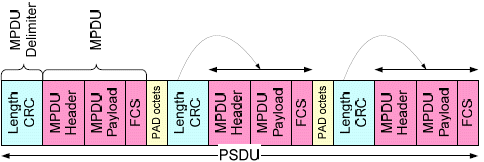
Aggregated MPDU allows aggregation of multiple MPDUs in one PSDU (PHY service data unit). See the A-MPDU formats below. An A-MPDU consists of a number of MPDU delimiters each followed by an MPDU. The MPDU delimiter is 4 bytes. Except when it is the last MPDU, padding octets are appended to make each section a multiple of 4 bytes in length.
|
SCPI Command |
[:SOURce]:RADio:WLAN:WAVeform:AC:VHT:USERsetup<channel>:AGGRegated:AMPDu ON|OFF|1|0 [:SOURce]:RADio:WLAN:WAVeform:AC:VHT:USERsetup<channel>:AGGRegated:AMPDu? |
|
SCPI Example |
|
|
Couplings |
|
|
Preset |
ON |
|
State Saved |
Yes |
Select the minimum time between the start of adjacent MPDUs within an A-MPDU.
The following figure shows the MPDU start spacing between two adjacent A-MPDU subframes.

When the spacing is shorter than the Minimum MPDU Start Spacing, one or more MPDU delimiters will be added as padding to extend the spacing. The following example shows padding with one MPDU delimiter. As a result, the length of the A-MPDU is extended by 4 octets.

|
SCPI Command |
[:SOURce]:RADio:WLAN:WAVeform:AC:VHT:USERsetup<channel>:MMPDu:SSPacing NORestriction|QUARter|HALF|ONE|TWO|FOUR|EIGHt|SIXTeen [:SOURce]:RADio:WLAN:WAVeform:AC:VHT:USERsetup<channel>:MMPDu:SSPacing? |
|
SCPI Example |
|
|
Couplings |
|
|
Preset |
NORestriction |
|
State Saved |
Yes |
Display the minimum octets between the start of adjacent MPDUs. Its value should be equal to or greater than Minimum MPDU Start Spacing X Data Rate / 8.
|
SCPI Command |
[:SOURce]:RADio:WLAN:WAVeform:AC:VHT:USERsetup<channel>:MMPDu:SSPacing:OCTets? |
|
SCPI Example |
|
|
Couplings |
|
|
Preset |
0 |
|
State Saved |
Yes |
|
Min |
|
|
Max |
|
Display the number of octets in the AMPDU pre-EOF padding carried in the PSDU of the current user. This is the LENGTH defined in the standard and is equal to the sum of A-MPDU Subframe Length in all MPDUs.
|
SCPI Command |
[:SOURce]:RADio:WLAN:WAVeform:AC:VHT:USERsetup<channel>:AMPDu:LENGth? |
|
SCPI Example |
|
|
Couplings |
|
|
Preset |
1062 |
|
State Saved |
Yes |
|
Min |
|
|
Max |
|
Enable or disable the MAC Layer Padding mode.
|
SCPI Command |
[:SOURce]:RADio:WLAN:WAVeform:AC:VHT:USERsetup<channel>:MAC:PADDing[:STATe] ON|OFF|1|0 [:SOURce]:RADio:WLAN:WAVeform:AC:VHT:USERsetup<channel>:MAC:PADDing[:STATe]? |
|
SCPI Example |
|
|
Couplings |
|
|
Preset |
ON |
|
State Saved |
Yes |
PSDU Length is calculated with Nsym. Nsym depends on original payload length of users.
|
SCPI Command |
[:SOURce]:RADio:WLAN:WAVeform:AC:VHT:USERsetup<channel>:PSDU:LENGth? |
|
SCPI Example |
|
|
Couplings |
|
|
Preset |
1089 |
|
State Saved |
Yes |
|
Min |
|
|
Max |
|
Applicable for Advanced Capability Only
Query only
Displays the index for each MPDU. This cell cannot be edited.
|
SCPI Command |
[:SOURce]:RADio:WLAN:WAVeform:AC:VHT:USERsetup<channel>:PAYLoad:INDex? |
|
SCPI Example |
|
|
Couplings |
|
|
Preset |
0 |
|
State Saved |
Yes |
|
Min |
|
|
Max |
|
Applicable for Advanced Capability Only
Displays the number of octets in the current MPDU, which is comprised of MSDU, MAC Header, and MAC FCS.
The maximum allowed MPDU length can be 11454 bytes.
MPDU Length becomes the same as Data Length when you disable MAC FCS and MAC Header.
|
SCPI Command |
[:SOURce]:RADio:WLAN:WAVeform:AC:VHT:USERsetup<channel>:PAYLoad:LENgth? |
|
SCPI Example |
|
|
Couplings |
|
|
Preset |
1058 |
|
State Saved |
Yes |
|
Min |
|
|
Max |
|
Select the payload bits stream. This is the actual user data carried by a frame.
|
SCPI Command |
[:SOURce]:RADio:WLAN:WAVeform:AC:VHT:USERsetup<channel>:PAYLoad:DATA:TYPE ALL|PN9|PN15|FILE [:SOURce]:RADio:WLAN:WAVeform:AC:VHT:USERsetup<channel>:PAYLoad:DATA:TYPE? |
|
SCPI Example |
|
|
Couplings |
|
|
Preset |
PN9 |
|
State Saved |
Yes |
Specify a seed, in decimal format, to generate a PN9 data sequence. The LSB of the seed comes out first. For example, if you enter a seed value of 10 (1010 in binary), the first 9 bits of the PN9 sequence are 0 1 0 1 0 0 0 0 0, with an increasing index from left to right. For more information, see PN Sequence Generation.
|
SCPI Command |
[:SOURce]:RADio:WLAN:WAVeform:AC:VHT:USERsetup<channel>:PAYLoad:DATA:PN9:SEED <integer> [:SOURce]:RADio:WLAN:WAVeform:AC:VHT:USERsetup<channel>:PAYLoad:DATA:PN9:SEED? |
|
SCPI Example |
|
|
Couplings |
|
|
Preset |
511 |
|
State Saved |
Yes |
|
Min |
|
|
Max |
|
Specify a seed in decimal format to generate a PN15 data sequence. The LSB of the seed comes out first. For example, if you enter a seed value of 10 (1010 in binary), the first 15 bits of the PN15 sequence are 0 1 0 1 0 0 0 0 0 0 0 0 0 0 0, with an increasing index from left to right. For more information, see PN Sequence Generation.
|
SCPI Command |
[:SOURce]:RADio:WLAN:WAVeform:AC:VHT:USERsetup<channel>:PAYLoad:DATA:PN15:SEED <integer> [:SOURce]:RADio:WLAN:WAVeform:AC:VHT:USERsetup<channel>:PAYLoad:DATA:PN15:SEED? |
|
SCPI Example |
|
|
Couplings |
|
|
Preset |
32767 |
|
State Saved |
Yes |
|
Min |
|
|
Max |
|
Click the > button displayed with this setting to select a user file as the data source.
The user file must be in binary form. The least significant bit (LSB) of the first byte in the user data file will be the first bit of the user payload; the LSB of the second byte in the user file will be the ninth bit of the user payload, and so on. If User file is selected as the Data Type, the value displayed in the Data Length field will be equal to the length of the user's data file, up to the maximum data length.
|
SCPI Command |
[:SOURce]:RADio:WLAN:WAVeform:AC:VHT:USERsetup<channel>:PAYLoad:DATA:FILE [:SOURce]:RADio:WLAN:WAVeform:AC:VHT:USERsetup<channel>:PAYLoad:DATA:FILE? |
|
SCPI Example |
|
|
Couplings |
|
|
Preset |
|
|
State Saved |
Yes |
Query only
Displays the User File Length in bytes.
|
SCPI Command |
[:SOURce]:RADio:WLAN:WAVeform:AC:VHT:USERsetup<channel>:PAYLoad:DATA:FILE:LENGth? |
|
SCPI Example |
|
|
Couplings |
|
|
Preset |
0 |
|
State Saved |
Yes |
Set the number of data bytes in the payload. The value is limited by MPDU Length (maximum MPDU Length allowed is 11454 bytes).
|
SCPI Command |
[:SOURce]:RADio:WLAN:WAVeform:AC:VHT:USERsetup<channel>:PAYLoad:DATA:LENGth <integer> [:SOURce]:RADio:WLAN:WAVeform:AC:VHT:USERsetup<channel>:PAYLoad:DATA:LENGth? |
|
SCPI Example |
|
|
Couplings |
|
|
Preset |
1024 |
|
State Saved |
Yes |
|
Min |
|
|
Max |
|
Applicable for Advanced Capability Only
Enable or disable appending the MAC FCS to the data payload. The FCS is automatically calculated by the software if this setting is enabled.
|
SCPI Command |
[:SOURce]:RADio:WLAN:WAVeform:AC:VHT:USERsetup<channel>:PAYLoad:MAC:FCS ON|OFF|1|0 [:SOURce]:RADio:WLAN:WAVeform:AC:VHT:USERsetup<channel>:PAYLoad:MAC:FCS? |
|
SCPI Example |
|
|
Couplings |
|
|
Preset |
ON |
|
State Saved |
Yes |
Applicable for Advanced Capability Only
Enable or disable incrementing the Sequence Number within the Sequence Control setting in the MAC Header. When it is turned ON, the Sequence Number increments by one after each user-specified interval of new frames. For an example of how incrementation works, see Incrementing Sequence and Fragment Numbers.
|
SCPI Command |
[:SOURce]:RADio:WLAN:WAVeform:AC:VHT:USERsetup<channel>:PAYLoad:INCRement:SEQuence[:STATe] ON|OFF|1|0 [:SOURce]:RADio:WLAN:WAVeform:AC:VHT:USERsetup<channel>:PAYLoad:INCRement:SEQuence[:STATe]? |
|
SCPI Example |
|
|
Couplings |
|
|
Preset |
ON |
|
State Saved |
Yes |
Applicable for Advanced Capability Only
Enable or disable incrementing the Fragment Number within the Sequence Control setting in the MAC Header. When it is turned ON, the Fragment Number increments by one after every assignment of a new frame. This field uses the Sequence Number Increment by Frames value as the upper limit. When the upper limit is reached, incrementation wraps back to zero. For an example of how incrementation works, see Incrementing Sequence and Fragment Numbers.
|
SCPI Command |
[:SOURce]:RADio:WLAN:WAVeform:AC:VHT:USERsetup<channel>:PAYLoad:INCRement:FRAGment[:STATe] ON|OFF|1|0 [:SOURce]:RADio:WLAN:WAVeform:AC:VHT:USERsetup<channel>:PAYLoad:INCRement:FRAGment[:STATe]? |
|
SCPI Example |
|
|
Couplings |
|
|
Preset |
ON |
|
State Saved |
Yes |
Applicable for Advanced Capability Only
The number of frames you set in this setting determines when the Sequence Number within the Sequence Controlsetting in the MAC Header is incremented. For an example of how incrementation works, see Incrementing Sequence and Fragment Numbers.
|
SCPI Command |
[:SOURce]:RADio:WLAN:WAVeform:AC:VHT:USERsetup<channel>:PAYLoad:INCRement:SEQuence:FRAMes <integer> [:SOURce]:RADio:WLAN:WAVeform:AC:VHT:USERsetup<channel>:PAYLoad:INCRement:SEQuence:FRAMes? |
|
SCPI Example |
|
|
Couplings |
|
|
Preset |
1 |
|
State Saved |
Yes |
|
Min |
|
|
Max |
|
Click the > button displayed with this setting to open the MAC Header dialog, which enables or disables pre-pending the MAC header to the data payload. You can select General, RTS, CTS, or ACK MAC frame format by clicking the down-arrow in the top right corner of the Mac Header dialog. You can set the desired data in each of the individual fields for each format. You can also disable these fields if the data is no longer desired by clearing the checkbox for each of these.
|
SCPI Command |
[:SOURce]:RADio:WLAN:WAVeform:AC:VHT:USERsetup<channel>:PAYLoad:MAC:HEADer[:STATe] ON|OFF|1|0 [:SOURce]:RADio:WLAN:WAVeform:AC:VHT:USERsetup<channel>:PAYLoad:MAC:HEADer[:STATe]? |
|
SCPI Example |
|
|
Couplings |
|
|
Preset |
ON |
|
State Saved |
Yes |
|
SCPI Command |
[:SOURce]:RADio:WLAN:WAVeform:AC:VHT:USERsetup<channel>:PAYLoad:MAC:HEADer:TYPE GENeral|RTS|CTS|ACK [:SOURce]:RADio:WLAN:WAVeform:AC:VHT:USERsetup<channel>:PAYLoad:MAC:HEADer:TYPE? |
|
SCPI Example |
|
|
Couplings |
|
|
Preset |
GENeral |
|
State Saved |
Yes |
|
SCPI Command |
[:SOURce]:RADio:WLAN:WAVeform:AC:VHT:USERsetup<channel>:PAYLoad:MAC:HEADer:LENGth? |
|
SCPI Example |
|
|
Couplings |
|
|
Preset |
30 |
|
State Saved |
Yes |
|
Min |
|
|
Max |
|
|
SCPI Command |
[:SOURce]:RADio:WLAN:WAVeform:AC:VHT:USERsetup<channel>:PAYLoad:MAC:HEADer:FRAMe[:STATe]? |
|
SCPI Example |
|
|
Couplings |
|
|
Preset |
ON |
|
State Saved |
Yes |
|
SCPI Command |
[:SOURce]:RADio:WLAN:WAVeform:AC:VHT:USERsetup<channel>:PAYLoad:MAC:HEADer:FRAMe:SIZE? |
|
SCPI Example |
|
|
Couplings |
|
|
Preset |
2 |
|
State Saved |
Yes |
|
Min |
|
|
Max |
|
|
SCPI Command |
[:SOURce]:RADio:WLAN:WAVeform:AC:VHT:USERsetup<channel>:PAYLoad:MAC:HEADer:FRAMe:CONTent <integer> [:SOURce]:RADio:WLAN:WAVeform:AC:VHT:USERsetup<channel>:PAYLoad:MAC:HEADer:FRAMe:CONTent? |
|
SCPI Example |
|
|
Couplings |
|
|
Preset |
2048 |
|
State Saved |
Yes |
|
Min |
|
|
Max |
|
|
SCPI Command |
[:SOURce]:RADio:WLAN:WAVeform:AC:VHT:USERsetup<channel>:PAYLoad:MAC:HEADer:DURation[:STATe]? |
|
SCPI Example |
|
|
Couplings |
|
|
Preset |
ON |
|
State Saved |
Yes |
|
SCPI Command |
[:SOURce]:RADio:WLAN:WAVeform:AC:VHT:USERsetup<channel>:PAYLoad:MAC:HEADer:DURation:SIZE? |
|
SCPI Example |
|
|
Couplings |
|
|
Preset |
2 |
|
State Saved |
Yes |
|
Min |
|
|
Max |
|
|
SCPI Command |
[:SOURce]:RADio:WLAN:WAVeform:AC:VHT:USERsetup<channel>:PAYLoad:MAC:HEADer:DURation:CONTent <integer> [:SOURce]:RADio:WLAN:WAVeform:AC:VHT:USERsetup<channel>:PAYLoad:MAC:HEADer:DURation:CONTent? |
|
SCPI Example |
|
|
Couplings |
|
|
Preset |
0 |
|
State Saved |
Yes |
|
Min |
|
|
Max |
|
|
SCPI Command |
[:SOURce]:RADio:WLAN:WAVeform:AC:VHT:USERsetup<channel>:PAYLoad:MAC:HEADer:ADDRess:A1[:STATe] ON|OFF|1|0 [:SOURce]:RADio:WLAN:WAVeform:AC:VHT:USERsetup<channel>:PAYLoad:MAC:HEADer:ADDRess:A1[:STATe]? |
|
SCPI Example |
|
|
Couplings |
|
|
Preset |
ON |
|
State Saved |
Yes |
|
SCPI Command |
[:SOURce]:RADio:WLAN:WAVeform:AC:VHT:USERsetup<channel>:PAYLoad:MAC:HEADer:ADDRess:A1:SIZE? |
|
SCPI Example |
|
|
Couplings |
|
|
Preset |
6 |
|
State Saved |
Yes |
|
Min |
|
|
Max |
|
|
SCPI Command |
[:SOURce]:RADio:WLAN:WAVeform:AC:VHT:USERsetup<channel>:PAYLoad:MAC:HEADer:ADDRess:A1:CONTent <integer> [:SOURce]:RADio:WLAN:WAVeform:AC:VHT:USERsetup<channel>:PAYLoad:MAC:HEADer:ADDRess:A1:CONTent? |
|
SCPI Example |
|
|
Couplings |
|
|
Preset |
0 |
|
State Saved |
Yes |
|
SCPI Command |
[:SOURce]:RADio:WLAN:WAVeform:AC:VHT:USERsetup<channel>:PAYLoad:MAC:HEADer:ADDRess:A2[:STATe] ON|OFF|1|0 [:SOURce]:RADio:WLAN:WAVeform:AC:VHT:USERsetup<channel>:PAYLoad:MAC:HEADer:ADDRess:A2[:STATe]? |
|
SCPI Example |
|
|
Couplings |
|
|
Preset |
ON |
|
State Saved |
Yes |
|
SCPI Command |
[:SOURce]:RADio:WLAN:WAVeform:AC:VHT:USERsetup<channel>:PAYLoad:MAC:HEADer:ADDRess:A2:SIZE? |
|
SCPI Example |
|
|
Couplings |
|
|
Preset |
6 |
|
State Saved |
Yes |
|
Min |
|
|
Max |
|
|
SCPI Command |
[:SOURce]:RADio:WLAN:WAVeform:AC:VHT:USERsetup<channel>:PAYLoad:MAC:HEADer:ADDRess:A2:CONTent <integer> [:SOURce]:RADio:WLAN:WAVeform:AC:VHT:USERsetup<channel>:PAYLoad:MAC:HEADer:ADDRess:A2:CONTent? |
|
SCPI Example |
|
|
Couplings |
|
|
Preset |
0 |
|
State Saved |
Yes |
|
SCPI Command |
[:SOURce]:RADio:WLAN:WAVeform:AC:VHT:USERsetup<channel>:PAYLoad:MAC:HEADer:ADDRess:A3[:STATe] ON|OFF|1|0 [:SOURce]:RADio:WLAN:WAVeform:AC:VHT:USERsetup<channel>:PAYLoad:MAC:HEADer:ADDRess:A3[:STATe]? |
|
SCPI Example |
|
|
Couplings |
|
|
Preset |
ON |
|
State Saved |
Yes |
|
SCPI Command |
[:SOURce]:RADio:WLAN:WAVeform:AC:VHT:USERsetup<channel>:PAYLoad:MAC:HEADer:ADDRess:A3:SIZE? |
|
SCPI Example |
|
|
Couplings |
|
|
Preset |
6 |
|
State Saved |
Yes |
|
Min |
|
|
Max |
|
|
SCPI Command |
[:SOURce]:RADio:WLAN:WAVeform:AC:VHT:USERsetup<channel>:PAYLoad:MAC:HEADer:ADDRess:A3:CONTent <integer> [:SOURce]:RADio:WLAN:WAVeform:AC:VHT:USERsetup<channel>:PAYLoad:MAC:HEADer:ADDRess:A3:CONTent? |
|
SCPI Example |
|
|
Couplings |
|
|
Preset |
0 |
|
State Saved |
Yes |
|
Min |
|
|
Max |
|
|
SCPI Command |
[:SOURce]:RADio:WLAN:WAVeform:AC:VHT:USERsetup<channel>:PAYLoad:MAC:HEADer:ADDRess:A4[:STATe] ON|OFF|1|0 [:SOURce]:RADio:WLAN:WAVeform:AC:VHT:USERsetup<channel>:PAYLoad:MAC:HEADer:ADDRess:A4[:STATe]? |
|
SCPI Example |
|
|
Couplings |
|
|
Preset |
ON |
|
State Saved |
Yes |
|
SCPI Command |
[:SOURce]:RADio:WLAN:WAVeform:AC:VHT:USERsetup<channel>:PAYLoad:MAC:HEADer:ADDRess:A4:SIZE? |
|
SCPI Example |
|
|
Couplings |
|
|
Preset |
6 |
|
State Saved |
Yes |
|
Min |
|
|
Max |
|
|
SCPI Command |
[:SOURce]:RADio:WLAN:WAVeform:AC:VHT:USERsetup<channel>:PAYLoad:MAC:HEADer:ADDRess:A4:CONTent <integer> [:SOURce]:RADio:WLAN:WAVeform:AC:VHT:USERsetup<channel>:PAYLoad:MAC:HEADer:ADDRess:A4:CONTent? |
|
SCPI Example |
|
|
Couplings |
|
|
Preset |
0 |
|
State Saved |
Yes |
|
Min |
|
|
Max |
|
|
SCPI Command |
[:SOURce]:RADio:WLAN:WAVeform:AC:VHT:USERsetup<channel>:PAYLoad:MAC:HEADer:SEQ[:STATe] ON|OFF|1|0 [:SOURce]:RADio:WLAN:WAVeform:AC:VHT:USERsetup<channel>:PAYLoad:MAC:HEADer:SEQ[:STATe]? |
|
SCPI Example |
|
|
Couplings |
|
|
Preset |
ON |
|
State Saved |
Yes |
|
SCPI Command |
[:SOURce]:RADio:WLAN:WAVeform:AC:VHT:USERsetup<channel>:PAYLoad:MAC:HEADer:SEQ:SIZE? |
|
SCPI Example |
|
|
Couplings |
|
|
Preset |
2 |
|
State Saved |
Yes |
|
Min |
|
|
Max |
|
|
SCPI Command |
[:SOURce]:RADio:WLAN:WAVeform:AC:VHT:USERsetup<channel>:PAYLoad:MAC:HEADer:SEQ:CONTent <integer> [:SOURce]:RADio:WLAN:WAVeform:AC:VHT:USERsetup<channel>:PAYLoad:MAC:HEADer:SEQ:CONTent? |
|
SCPI Example |
|
|
Couplings |
|
|
Preset |
0 |
|
State Saved |
Yes |
|
Min |
|
|
Max |
|
|
SCPI Command |
[:SOURce]:RADio:WLAN:WAVeform:AC:VHT:USERsetup<channel>:PAYLoad:MAC:HEADer:QOS[:STATe] ON|OFF|1|0 [:SOURce]:RADio:WLAN:WAVeform:AC:VHT:USERsetup<channel>:PAYLoad:MAC:HEADer:QOS[:STATe]? |
|
SCPI Example |
|
|
Couplings |
|
|
Preset |
OFF |
|
State Saved |
Yes |
|
SCPI Command |
[:SOURce]:RADio:WLAN:WAVeform:AC:VHT:USERsetup<channel>:PAYLoad:MAC:HEADer:QOS:SIZE? |
|
SCPI Example |
|
|
Couplings |
|
|
Preset |
2 |
|
State Saved |
Yes |
|
Min |
|
|
Max |
|
|
SCPI Command |
[:SOURce]:RADio:WLAN:WAVeform:AC:VHT:USERsetup<channel>:PAYLoad:MAC:HEADer:QOS:CONTent <integer> [:SOURce]:RADio:WLAN:WAVeform:AC:VHT:USERsetup<channel>:PAYLoad:MAC:HEADer:QOS:CONTent? |
|
SCPI Example |
|
|
Couplings |
|
|
Preset |
0 |
|
State Saved |
Yes |
|
Min |
|
|
Max |
|
|
SCPI Command |
[:SOURce]:RADio:WLAN:WAVeform:AC:VHT:USERsetup<channel>:PAYLoad:MAC:HEADer:HT[:STATe] ON|OFF|1|0 [:SOURce]:RADio:WLAN:WAVeform:AC:VHT:USERsetup<channel>:PAYLoad:MAC:HEADer:HT[:STATe]? |
|
SCPI Example |
|
|
Couplings |
|
|
Preset |
OFF |
|
State Saved |
Yes |
|
SCPI Command |
[:SOURce]:RADio:WLAN:WAVeform:AC:VHT:USERsetup<channel>:PAYLoad:MAC:HEADer:HT:SIZE? |
|
SCPI Example |
|
|
Couplings |
|
|
Preset |
4 |
|
State Saved |
Yes |
|
Min |
|
|
Max |
|
|
SCPI Command |
[:SOURce]:RADio:WLAN:WAVeform:AC:VHT:USERsetup<channel>:PAYLoad:MAC:HEADer:HT:CONTent <integer> [:SOURce]:RADio:WLAN:WAVeform:AC:VHT:USERsetup<channel>:PAYLoad:MAC:HEADer:HT:CONTent? |
|
SCPI Example |
|
|
Couplings |
|
|
Preset |
0 |
|
State Saved |
Yes |
|
Min |
|
|
Max |
|
Applicable for Advanced Capability Only
Indicates the total number of bytes contained in the Beacon frame, which includes the MAC header, frame body and FCS.
|
SCPI Command |
[:SOURce]:RADio:WLAN:WAVeform:AC:VHT:USERsetup<channel>:BEACon:FRAMe:LENGth <integer> [:SOURce]:RADio:WLAN:WAVeform:AC:VHT:USERsetup<channel>:BEACon:FRAMe:LENGth? |
|
SCPI Example |
|
|
Couplings |
|
|
Preset |
93 |
|
State Saved |
Yes |
|
Min |
|
|
Max |
|
Specify the byte order of a hexadecimal value entered into a GUI parameter field.
Little Endian - the leftmost byte (two digits) of the hexadecimal string is least significant and is transmitted first in the beacon frame.
Big Endian - the leftmost byte (two digits) of the hexadecimal string is most significant and is transmitted last in a the beacon frame.
For example, if you want to enter a numeric value of 3215267533596, you must first convert it to its hexadecimal form of 0x2EC9CE1131C. Then, in case of Little Endian, it should be entered into the GUI field as 1C13E19CEC2, while in the case of Big Endian, it should be entered as 2EC9CE1131C.
Hex byte order has no effect on the parameters that don't require hexadecimal input. Few parameters using a simple numerical value may still require hexadecimal input.
|
SCPI Command |
[:SOURce]:RADio:WLAN:WAVeform:AC:VHT:USERsetup<channel>:BEACon:HEX:ORDer LITTle|BIG [:SOURce]:RADio:WLAN:WAVeform:AC:VHT:USERsetup<channel>:BEACon:HEX:ORDer? |
|
SCPI Example |
|
|
Couplings |
|
|
Preset |
LITTle |
|
State Saved |
Yes |
Click the > button displayed with this setting to open the MAC Header dialog. You can set the desired data in each of the individual fields. You can also disable these fields if the data is no longer desired by clearing the checkbox and value for each of these.
|
SCPI Command |
[:SOURce]:RADio:WLAN:WAVeform:AC:VHT:USERsetup<channel>:BEACon:MAC:HEADer:LENGth? |
|
SCPI Example |
|
|
Couplings |
|
|
Preset |
28 |
|
State Saved |
Yes |
|
Min |
|
|
Max |
|
|
SCPI Command |
[:SOURce]:RADio:WLAN:WAVeform:AC:VHT:USERsetup<channel>:BEACon:MAC:HEADer:FRAMe[:STATe]? |
|
SCPI Example |
|
|
Couplings |
|
|
Preset |
ON |
|
State Saved |
Yes |
|
SCPI Command |
[:SOURce]:RADio:WLAN:WAVeform:AC:VHT:USERsetup<channel>:BEACon:MAC:HEADer:FRAMe:SIZE? |
|
SCPI Example |
|
|
Couplings |
|
|
Preset |
2 |
|
State Saved |
Yes |
|
Min |
|
|
Max |
|
|
SCPI Command |
[:SOURce]:RADio:WLAN:WAVeform:AC:VHT:USERsetup<channel>:BEACon:MAC:HEADer:FRAMe:CONTent <integer> [:SOURce]:RADio:WLAN:WAVeform:AC:VHT:USERsetup<channel>:BEACon:MAC:HEADer:FRAMe:CONTent? |
|
SCPI Example |
|
|
Couplings |
|
|
Preset |
32896 |
|
State Saved |
Yes |
|
Min |
|
|
Max |
|
|
SCPI Command |
[:SOURce]:RADio:WLAN:WAVeform:AC:VHT:USERsetup<channel>:BEACon:MAC:HEADer:DURation[:STATe]? |
|
SCPI Example |
|
|
Couplings |
|
|
Preset |
ON |
|
State Saved |
Yes |
|
SCPI Command |
[:SOURce]:RADio:WLAN:WAVeform:AC:VHT:USERsetup<channel>:BEACon:MAC:HEADer:DURation:SIZE? |
|
SCPI Example |
|
|
Couplings |
|
|
Preset |
2 |
|
State Saved |
Yes |
|
Min |
|
|
Max |
|
|
SCPI Command |
[:SOURce]:RADio:WLAN:WAVeform:AC:VHT:USERsetup<channel>:BEACon:MAC:HEADer:DURation:CONTent <integer> [:SOURce]:RADio:WLAN:WAVeform:AC:VHT:USERsetup<channel>:BEACon:MAC:HEADer:DURation:CONTent? |
|
SCPI Example |
|
|
Couplings |
|
|
Preset |
0 |
|
State Saved |
Yes |
|
Min |
|
|
Max |
|
|
SCPI Command |
[:SOURce]:RADio:WLAN:WAVeform:AC:VHT:USERsetup<channel>:BEACon:MAC:HEADer:ADDRess:A1[:STATe]? |
|
SCPI Example |
|
|
Couplings |
|
|
Preset |
ON |
|
State Saved |
Yes |
|
SCPI Command |
[:SOURce]:RADio:WLAN:WAVeform:AC:VHT:USERsetup<channel>:BEACon:MAC:HEADer:ADDRess:A1:SIZE? |
|
SCPI Example |
|
|
Couplings |
|
|
Preset |
6 |
|
State Saved |
Yes |
|
Min |
|
|
Max |
|
|
SCPI Command |
[:SOURce]:RADio:WLAN:WAVeform:AC:VHT:USERsetup<channel>:BEACon:MAC:HEADer:ADDRess:A1:CONTent <integer> [:SOURce]:RADio:WLAN:WAVeform:AC:VHT:USERsetup<channel>:BEACon:MAC:HEADer:ADDRess:A1:CONTent? |
|
SCPI Example |
|
|
Couplings |
|
|
Preset |
0 |
|
State Saved |
Yes |
|
Min |
- |
|
Max |
|
Indicates the Enable status of SA field in GUI.
|
SCPI Command |
[:SOURce]:RADio:WLAN:WAVeform:AC:VHT:USERsetup<channel>:BEACon:MAC:HEADer:ADDRess:A2[:STATe]? |
|
SCPI Example |
|
|
Couplings |
|
|
Preset |
ON |
|
State Saved |
Yes |
Indicates the Number of Bytes of SA field in GUI.
|
SCPI Command |
[:SOURce]:RADio:WLAN:WAVeform:AC:VHT:USERsetup<channel>:BEACon:MAC:HEADer:ADDRess:A2:SIZE? |
|
SCPI Example |
|
|
Couplings |
|
|
Preset |
6 |
|
State Saved |
Yes |
|
Min |
|
|
Max |
|
Specifies the value of SA field in GUI.
|
SCPI Command |
[:SOURce]:RADio:WLAN:WAVeform:AC:VHT:USERsetup<channel>:BEACon:MAC:HEADer:ADDRess:A2:CONTent <integer> [:SOURce]:RADio:WLAN:WAVeform:AC:VHT:USERsetup<channel>:BEACon:MAC:HEADer:ADDRess:A2:CONTent? |
|
SCPI Example |
|
|
Couplings |
|
|
Preset |
0 |
|
State Saved |
Yes |
|
Min |
- |
|
Max |
|
Specifies the Enable state of BSSID field in GUI.
|
SCPI Command |
[:SOURce]:RADio:WLAN:WAVeform:AC:VHT:USERsetup<channel>:BEACon:MAC:HEADer:ADDRess:A3[:STATe]? |
|
SCPI Example |
|
|
Couplings |
|
|
Preset |
ON |
|
State Saved |
Yes |
Specifies the Number of Bytes of BSSID field in GUI.
|
SCPI Command |
[:SOURce]:RADio:WLAN:WAVeform:AC:VHT:USERsetup<channel>:BEACon:MAC:HEADer:ADDRess:A3:SIZE? |
|
SCPI Example |
|
|
Couplings |
|
|
Preset |
6 |
|
State Saved |
Yes |
|
Min |
|
|
Max |
|
Specifies the value of BSSID field in GUI.
|
SCPI Command |
[:SOURce]:RADio:WLAN:WAVeform:AC:VHT:USERsetup<channel>:BEACon:MAC:HEADer:ADDRess:A3:CONTent <integer> [:SOURce]:RADio:WLAN:WAVeform:AC:VHT:USERsetup<channel>:BEACon:MAC:HEADer:ADDRess:A3:CONTent? |
|
SCPI Example |
|
|
Couplings |
|
|
Preset |
0 |
|
State Saved |
Yes |
|
Min |
- |
|
Max |
|
|
SCPI Command |
[:SOURce]:RADio:WLAN:WAVeform:AC:VHT:USERsetup<channel>:BEACon:MAC:HEADer:SEQ[:STATe]? |
|
SCPI Example |
|
|
Couplings |
|
|
Preset |
ON |
|
State Saved |
Yes |
|
SCPI Command |
[:SOURce]:RADio:WLAN:WAVeform:AC:VHT:USERsetup<channel>:BEACon:MAC:HEADer:SEQ:SIZE? |
|
SCPI Example |
|
|
Couplings |
|
|
Preset |
2 |
|
State Saved |
Yes |
|
Min |
|
|
Max |
|
|
SCPI Command |
[:SOURce]:RADio:WLAN:WAVeform:AC:VHT:USERsetup<channel>:BEACon:MAC:HEADer:SEQ:CONTent <integer> [:SOURce]:RADio:WLAN:WAVeform:AC:VHT:USERsetup<channel>:BEACon:MAC:HEADer:SEQ:CONTent? |
|
SCPI Example |
|
|
Couplings |
|
|
Preset |
0 |
|
State Saved |
Yes |
|
Min |
|
|
Max |
|
|
SCPI Command |
[:SOURce]:RADio:WLAN:WAVeform:AC:VHT:USERsetup<channel>:BEACon:MAC:HEADer:HT[:STATe] ON|OFF|1|0 [:SOURce]:RADio:WLAN:WAVeform:AC:VHT:USERsetup<channel>:BEACon:MAC:HEADer:HT[:STATe]? |
|
SCPI Example |
|
|
Couplings |
|
|
Preset |
OFF |
|
State Saved |
Yes |
|
SCPI Command |
[:SOURce]:RADio:WLAN:WAVeform:AC:VHT:USERsetup<channel>:BEACon:MAC:HEADer:HT:SIZE? |
|
SCPI Example |
|
|
Couplings |
|
|
Preset |
4 |
|
State Saved |
Yes |
|
Min |
|
|
Max |
|
|
SCPI Command |
[:SOURce]:RADio:WLAN:WAVeform:AC:VHT:USERsetup<channel>:BEACon:MAC:HEADer:HT:CONTent <integer> [:SOURce]:RADio:WLAN:WAVeform:AC:VHT:USERsetup<channel>:BEACon:MAC:HEADer:HT:CONTent? |
|
SCPI Example |
|
|
Couplings |
|
|
Preset |
0 |
|
State Saved |
Yes |
|
Min |
|
|
Max |
|
Represents the value of the timing synchronization function (TSF) timer of a frame’s source. The length of the time stamp field is 8 octets.
|
SCPI Command |
[:SOURce]:RADio:WLAN:WAVeform:AC:VHT:USERsetup<channel>:BEACon:TIME:STAMp [:SOURce]:RADio:WLAN:WAVeform:AC:VHT:USERsetup<channel>:BEACon:TIME:STAMp? |
|
SCPI Example |
|
|
Couplings |
|
|
Preset |
"0000000000000000" |
|
State Saved |
Yes |
Represents the number of time units (TUs) between target beacon transmission times (TBTTs). One time unit (TU) equals 1024 µs. The length of the Beacon Interval field is 2 octets.
|
SCPI Command |
[:SOURce]:RADio:WLAN:WAVeform:AC:VHT:USERsetup<channel>:BEACon:INTerval <integer> [:SOURce]:RADio:WLAN:WAVeform:AC:VHT:USERsetup<channel>:BEACon:INTerval? |
|
SCPI Example |
|
|
Couplings |
|
|
Preset |
100 |
|
State Saved |
Yes |
|
Min |
|
|
Max |
|
Click the > button displayed with the Capability setting to open the Capability dialog that contains a number of subfields that are used to indicate requested or advertised optional capabilities. The length of the Capability field is 2 octets.
|
SCPI Command |
[:SOURce]:RADio:WLAN:WAVeform:AC:VHT:USERsetup<channel>:BEACon:CAPability:LENGth? |
|
SCPI Example |
|
|
Couplings |
|
|
Preset |
2 |
|
State Saved |
Yes |
|
Min |
|
|
Max |
|
|
SCPI Command |
[:SOURce]:RADio:WLAN:WAVeform:AC:VHT:USERsetup<channel>:BEACon:CAPability:ESS[:STATe] ON|OFF|1|0 [:SOURce]:RADio:WLAN:WAVeform:AC:VHT:USERsetup<channel>:BEACon:CAPability:ESS[:STATe]? |
|
SCPI Example |
|
|
Couplings |
|
|
Preset |
ON |
|
State Saved |
Yes |
|
SCPI Command |
[:SOURce]:RADio:WLAN:WAVeform:AC:VHT:USERsetup<channel>:BEACon:CAPability:IBSS[:STATe] ON|OFF|1|0 [:SOURce]:RADio:WLAN:WAVeform:AC:VHT:USERsetup<channel>:BEACon:CAPability:IBSS[:STATe]? |
|
SCPI Example |
|
|
Couplings |
|
|
Preset |
OFF |
|
State Saved |
Yes |
|
SCPI Command |
[:SOURce]:RADio:WLAN:WAVeform:AC:VHT:USERsetup<channel>:BEACon:CAPability:CFPOllable[:STATe] ON|OFF|1|0 [:SOURce]:RADio:WLAN:WAVeform:AC:VHT:USERsetup<channel>:BEACon:CAPability:CFPOllable[:STATe]? |
|
SCPI Example |
|
|
Couplings |
|
|
Preset |
OFF |
|
State Saved |
Yes |
|
SCPI Command |
[:SOURce]:RADio:WLAN:WAVeform:AC:VHT:USERsetup<channel>:BEACon:CAPability:CFPRequest[:STATe] ON|OFF|1|0 [:SOURce]:RADio:WLAN:WAVeform:AC:VHT:USERsetup<channel>:BEACon:CAPability:CFPRequest[:STATe]? |
|
SCPI Example |
|
|
Couplings |
|
|
Preset |
OFF |
|
State Saved |
Yes |
|
SCPI Command |
[:SOURce]:RADio:WLAN:WAVeform:AC:VHT:USERsetup<channel>:BEACon:CAPability:PRIVacy[:STATe] ON|OFF|1|0 [:SOURce]:RADio:WLAN:WAVeform:AC:VHT:USERsetup<channel>:BEACon:CAPability:PRIVacy[:STATe]? |
|
SCPI Example |
|
|
Couplings |
|
|
Preset |
ON |
|
State Saved |
Yes |
|
SCPI Command |
[:SOURce]:RADio:WLAN:WAVeform:AC:VHT:USERsetup<channel>:BEACon:CAPability:SPReamble[:STATe] ON|OFF|1|0 [:SOURce]:RADio:WLAN:WAVeform:AC:VHT:USERsetup<channel>:BEACon:CAPability:SPReamble[:STATe]? |
|
SCPI Example |
|
|
Couplings |
|
|
Preset |
ON |
|
State Saved |
Yes |
|
SCPI Command |
[:SOURce]:RADio:WLAN:WAVeform:AC:VHT:USERsetup<channel>:BEACon:CAPability:PBCC[:STATe] ON|OFF|1|0 [:SOURce]:RADio:WLAN:WAVeform:AC:VHT:USERsetup<channel>:BEACon:CAPability:PBCC[:STATe]? |
|
SCPI Example |
|
|
Couplings |
|
|
Preset |
OFF |
|
State Saved |
Yes |
|
SCPI Command |
[:SOURce]:RADio:WLAN:WAVeform:AC:VHT:USERsetup<channel>:BEACon:CAPability:CAGility[:STATe] ON|OFF|1|0 [:SOURce]:RADio:WLAN:WAVeform:AC:VHT:USERsetup<channel>:BEACon:CAPability:CAGility[:STATe]? |
|
SCPI Example |
|
|
Couplings |
|
|
Preset |
OFF |
|
State Saved |
Yes |
|
SCPI Command |
[:SOURce]:RADio:WLAN:WAVeform:AC:VHT:USERsetup<channel>:BEACon:CAPability:SPECtrum[:STATe] ON|OFF|1|0 [:SOURce]:RADio:WLAN:WAVeform:AC:VHT:USERsetup<channel>:BEACon:CAPability:SPECtrum[:STATe]? |
|
SCPI Example |
|
|
Couplings |
|
|
Preset |
OFF |
|
State Saved |
Yes |
|
SCPI Command |
[:SOURce]:RADio:WLAN:WAVeform:AC:VHT:USERsetup<channel>:BEACon:CAPability:QOS[:STATe] ON|OFF|1|0 [:SOURce]:RADio:WLAN:WAVeform:AC:VHT:USERsetup<channel>:BEACon:CAPability:QOS[:STATe]? |
|
SCPI Example |
|
|
Couplings |
|
|
Preset |
OFF |
|
State Saved |
Yes |
|
SCPI Command |
[:SOURce]:RADio:WLAN:WAVeform:AC:VHT:USERsetup<channel>:BEACon:CAPability:SSTime[:STATe] ON|OFF|1|0 [:SOURce]:RADio:WLAN:WAVeform:AC:VHT:USERsetup<channel>:BEACon:CAPability:SSTime[:STATe]? |
|
SCPI Example |
|
|
Couplings |
|
|
Preset |
OFF |
|
State Saved |
Yes |
|
SCPI Command |
[:SOURce]:RADio:WLAN:WAVeform:AC:VHT:USERsetup<channel>:BEACon:CAPability:APSD[:STATe] ON|OFF|1|0 [:SOURce]:RADio:WLAN:WAVeform:AC:VHT:USERsetup<channel>:BEACon:CAPability:APSD[:STATe]? |
|
SCPI Example |
|
|
Couplings |
|
|
Preset |
OFF |
|
State Saved |
Yes |
|
SCPI Command |
[:SOURce]:RADio:WLAN:WAVeform:AC:VHT:USERsetup<channel>:BEACon:CAPability:RADio:MEAsurement[:STATe] ON|OFF|1|0 [:SOURce]:RADio:WLAN:WAVeform:AC:VHT:USERsetup<channel>:BEACon:CAPability:RADio:MEAsurement[:STATe]? |
|
SCPI Example |
|
|
Couplings |
|
|
Preset |
OFF |
|
State Saved |
Yes |
|
SCPI Command |
[:SOURce]:RADio:WLAN:WAVeform:AC:VHT:USERsetup<channel>:BEACon:CAPability:DSSS:OFDM[:STATe] ON|OFF|1|0 [:SOURce]:RADio:WLAN:WAVeform:AC:VHT:USERsetup<channel>:BEACon:CAPability:DSSS:OFDM[:STATe]? |
|
SCPI Example |
|
|
Couplings |
|
|
Preset |
OFF |
|
State Saved |
Yes |
|
SCPI Command |
[:SOURce]:RADio:WLAN:WAVeform:AC:VHT:USERsetup<channel>:BEACon:CAPability:DBACk[:STATe] ON|OFF|1|0 [:SOURce]:RADio:WLAN:WAVeform:AC:VHT:USERsetup<channel>:BEACon:CAPability:DBACk[:STATe]? |
|
SCPI Example |
|
|
Couplings |
|
|
Preset |
OFF |
|
State Saved |
Yes |
|
SCPI Command |
[:SOURce]:RADio:WLAN:WAVeform:AC:VHT:USERsetup<channel>:BEACon:CAPability:IBACk[:STATe] ON|OFF|1|0 [:SOURce]:RADio:WLAN:WAVeform:AC:VHT:USERsetup<channel>:BEACon:CAPability:IBACk[:STATe]? |
|
SCPI Example |
|
|
Couplings |
|
|
Preset |
OFF |
|
State Saved |
Yes |
The SSID element specifies the identity of an ESS or IBSS. The number of characters of the identity is between 0 and 32. If you enter characters more than 32, it will be truncated to a length of 32.
SSID's element ID is 0, and its length is 2 to 34 octets.
|
SCPI Command |
[:SOURce]:RADio:WLAN:WAVeform:AC:VHT:USERsetup<channel>:BEACon:SSID [:SOURce]:RADio:WLAN:WAVeform:AC:VHT:USERsetup<channel>:BEACon:SSID? |
|
SCPI Example |
|
|
Couplings |
|
|
Preset |
"N7617C" |
|
State Saved |
Yes |
The Supported Rate setting specifies up to eight rates in the OperationalRateSet parameter, as described in the MLME-JOIN.request and MLME-START.request primitives, and zero or more BSS membership selectors. The Information field is encoded as 1 to 8 octets, where each octet describes a single Supported Rate or BSS membership selector. Supported Rate's element ID is 1, and its length is 3 to 10 octets.
|
SCPI Command |
[:SOURce]:RADio:WLAN:WAVeform:AC:VHT:USERsetup<channel>:BEACon:SUPPorted:RATe [:SOURce]:RADio:WLAN:WAVeform:AC:VHT:USERsetup<channel>:BEACon:SUPPorted:RATe? |
|
SCPI Example |
|
|
Couplings |
|
|
Preset |
"0000000000000000" |
|
State Saved |
Yes |
The DSSS Parameter Set element contains information to allow channel number identification for STAs. Its element ID is 3, and its length is 3 octets.
|
SCPI Command |
[:SOURce]:RADio:WLAN:WAVeform:AC:VHT:USERsetup<channel>:BEACon:DSSS [:SOURce]:RADio:WLAN:WAVeform:AC:VHT:USERsetup<channel>:BEACon:DSSS? |
|
SCPI Example |
|
|
Couplings |
|
|
Preset |
"00" |
|
State Saved |
Yes |
The IBSS Parameter Set element contains the set of parameters necessary to support an IBSS. The Information field contains the ATIM Window parameter. Its element ID is 6, and its length is 4 octets.
|
SCPI Command |
[:SOURce]:RADio:WLAN:WAVeform:AC:VHT:USERsetup<channel>:BEACon:IBSS [:SOURce]:RADio:WLAN:WAVeform:AC:VHT:USERsetup<channel>:BEACon:IBSS? |
|
SCPI Example |
|
|
Couplings |
|
|
Preset |
"0000" |
|
State Saved |
Yes |
Click the > button displayed with the ERP setting to open the ERP dialog box where you can configure the ERP parameters. The ERP element contains information on the presence of Clause 16 or Clause 17 STAs in the BSS that are not capable of Clause 19 (ERP-OFDM) data rates. It also contains the requirement of the ERP element sender (AP in an infrastructure BSS, STA in an IBSS, or mesh STA in an MBSS) as to the use of protection mechanisms to optimize BSS performance and as to the use of long or short Barker preambles.
Its element ID is 42, and its length is 3 octets.
|
SCPI Command |
[:SOURce]:RADio:WLAN:WAVeform:AC:VHT:USERsetup<channel>:BEACon:ERP:ENABled[:STATe] ON|OFF|1|0 [:SOURce]:RADio:WLAN:WAVeform:AC:VHT:USERsetup<channel>:BEACon:ERP:ENABled[:STATe]? |
|
SCPI Example |
|
|
Couplings |
|
|
Preset |
ON |
|
State Saved |
Yes |
Query only
This SCPI value is returned as a decimal, but the GUI displays it in the hexadecimal format.
|
SCPI Command |
[:SOURce]:RADio:WLAN:WAVeform:AC:VHT:USERsetup<channel>:BEACon:ERP:ELMentid? |
|
SCPI Example |
|
|
Couplings |
|
|
Preset |
42 |
|
State Saved |
Yes |
|
Min |
|
|
Max |
|
The value of this setting is in decimal format, while the GUI displays it in hexadecimal.
|
SCPI Command |
[:SOURce]:RADio:WLAN:WAVeform:AC:VHT:USERsetup<channel>:BEACon:ERP:LENGth? |
|
SCPI Example |
|
|
Couplings |
|
|
Preset |
1 |
|
State Saved |
Yes |
|
Min |
|
|
Max |
|
|
SCPI Command |
[:SOURce]:RADio:WLAN:WAVeform:AC:VHT:USERsetup<channel>:BEACon:ERP:NEPR:PRESent[:STATe] ON|OFF|1|0 [:SOURce]:RADio:WLAN:WAVeform:AC:VHT:USERsetup<channel>:BEACon:ERP:NEPR:PRESent[:STATe]? |
|
SCPI Example |
|
|
Couplings |
|
|
Preset |
OFF |
|
State Saved |
Yes |
|
SCPI Command |
[:SOURce]:RADio:WLAN:WAVeform:AC:VHT:USERsetup<channel>:BEACon:ERP:USE:PROTection[:STATe] ON|OFF|1|0 [:SOURce]:RADio:WLAN:WAVeform:AC:VHT:USERsetup<channel>:BEACon:ERP:USE:PROTection[:STATe]? |
|
SCPI Example |
|
|
Couplings |
|
|
Preset |
OFF |
|
State Saved |
Yes |
|
SCPI Command |
[:SOURce]:RADio:WLAN:WAVeform:AC:VHT:USERsetup<channel>:BEACon:ERP:BPMode[:STATe] ON|OFF|1|0 [:SOURce]:RADio:WLAN:WAVeform:AC:VHT:USERsetup<channel>:BEACon:ERP:BPMode[:STATe]? |
|
SCPI Example |
|
|
Couplings |
|
|
Preset |
OFF |
|
State Saved |
Yes |
Click the > button displayed with this setting to open the HT Capabilities window where you can configure HT capabilities parameters. An HT STA declares that it is an HT STA by transmitting the HT Capabilities element. The HT Capabilities element contains a number of fields that are used to advertise optional HT capabilities of an HT STA.
Its element ID is 45, and its length is 28 octets.
|
SCPI Command |
[:SOURce]:RADio:WLAN:WAVeform:AC:VHT:USERsetup<channel>:BEACon:HT:CAPability:ENABled[:STATe] ON|OFF|1|0 [:SOURce]:RADio:WLAN:WAVeform:AC:VHT:USERsetup<channel>:BEACon:HT:CAPability:ENABled[:STATe]? |
|
SCPI Example |
|
|
Couplings |
|
|
Preset |
OFF |
|
State Saved |
Yes |
The value of this setting is in decimal format, while the GUI displays it in hexadecimal.
|
SCPI Command |
[:SOURce]:RADio:WLAN:WAVeform:AC:VHT:USERsetup<channel>:BEACon:HT:CAPability:EID? |
|
SCPI Example |
|
|
Couplings |
|
|
Preset |
45 |
|
State Saved |
Yes |
The value of this setting is in decimal format, while the GUI displays it in hexadecimal.
|
SCPI Command |
[:SOURce]:RADio:WLAN:WAVeform:AC:VHT:USERsetup<channel>:BEACon:HT:CAPability:LENGth? |
|
SCPI Example |
|
|
Couplings |
|
|
Preset |
26 |
|
State Saved |
Yes |
|
SCPI Command |
[:SOURce]:RADio:WLAN:WAVeform:AC:VHT:USERsetup<channel>:BEACon:HT:CAPability:LDPC:CODing[:STATe] ON|OFF|1|0 [:SOURce]:RADio:WLAN:WAVeform:AC:VHT:USERsetup<channel>:BEACon:HT:CAPability:LDPC:CODing[:STATe]? |
|
SCPI Example |
|
|
Couplings |
|
|
Preset |
ON |
|
State Saved |
Yes |
|
SCPI Command |
[:SOURce]:RADio:WLAN:WAVeform:AC:VHT:USERsetup<channel>:BEACon:HT:CAPability:CWDidth[:STATe] ON|OFF|1|0 [:SOURce]:RADio:WLAN:WAVeform:AC:VHT:USERsetup<channel>:BEACon:HT:CAPability:CWDidth[:STATe]? |
|
SCPI Example |
|
|
Couplings |
|
|
Preset |
ON |
|
State Saved |
Yes |
|
SCPI Command |
[:SOURce]:RADio:WLAN:WAVeform:AC:VHT:USERsetup<channel>:BEACon:HT:CAPability:SMPSave:B0[:STATe] ON|OFF|1|0 [:SOURce]:RADio:WLAN:WAVeform:AC:VHT:USERsetup<channel>:BEACon:HT:CAPability:SMPSave:B0[:STATe]? |
|
SCPI Example |
|
|
Couplings |
|
|
Preset |
ON |
|
State Saved |
Yes |
|
SCPI Command |
[:SOURce]:RADio:WLAN:WAVeform:AC:VHT:USERsetup<channel>:BEACon:HT:CAPability:SMPSave:B1[:STATe] ON|OFF|1|0 [:SOURce]:RADio:WLAN:WAVeform:AC:VHT:USERsetup<channel>:BEACon:HT:CAPability:SMPSave:B1[:STATe]? |
|
SCPI Example |
|
|
Couplings |
|
|
Preset |
ON |
|
State Saved |
Yes |
|
SCPI Command |
[:SOURce]:RADio:WLAN:WAVeform:AC:VHT:USERsetup<channel>:BEACon:HT:CAPability:GREen[:STATe] ON|OFF|1|0 [:SOURce]:RADio:WLAN:WAVeform:AC:VHT:USERsetup<channel>:BEACon:HT:CAPability:GREen[:STATe]? |
|
SCPI Example |
|
|
Couplings |
|
|
Preset |
ON |
|
State Saved |
Yes |
|
SCPI Command |
[:SOURce]:RADio:WLAN:WAVeform:AC:VHT:USERsetup<channel>:BEACon:HT:CAPability:SGI:CBW20[:STATe] ON|OFF|1|0 [:SOURce]:RADio:WLAN:WAVeform:AC:VHT:USERsetup<channel>:BEACon:HT:CAPability:SGI:CBW20[:STATe]? |
|
SCPI Example |
|
|
Couplings |
|
|
Preset |
ON |
|
State Saved |
Yes |
|
SCPI Command |
[:SOURce]:RADio:WLAN:WAVeform:AC:VHT:USERsetup<channel>:BEACon:HT:CAPability:SGI:CBW40[:STATe] ON|OFF|1|0 [:SOURce]:RADio:WLAN:WAVeform:AC:VHT:USERsetup<channel>:BEACon:HT:CAPability:SGI:CBW40[:STATe]? |
|
SCPI Example |
|
|
Couplings |
|
|
Preset |
ON |
|
State Saved |
Yes |
|
SCPI Command |
[:SOURce]:RADio:WLAN:WAVeform:AC:VHT:USERsetup<channel>:BEACon:HT:CAPability:TX:STBC[:STATe] ON|OFF|1|0 [:SOURce]:RADio:WLAN:WAVeform:AC:VHT:USERsetup<channel>:BEACon:HT:CAPability:TX:STBC[:STATe]? |
|
SCPI Example |
|
|
Couplings |
|
|
Preset |
ON |
|
State Saved |
Yes |
|
SCPI Command |
[:SOURce]:RADio:WLAN:WAVeform:AC:VHT:USERsetup<channel>:BEACon:HT:CAPability:RX:STBC:B0[:STATe] ON|OFF|1|0 [:SOURce]:RADio:WLAN:WAVeform:AC:VHT:USERsetup<channel>:BEACon:HT:CAPability:RX:STBC:B0[:STATe]? |
|
SCPI Example |
|
|
Couplings |
|
|
Preset |
ON |
|
State Saved |
Yes |
|
SCPI Command |
[:SOURce]:RADio:WLAN:WAVeform:AC:VHT:USERsetup<channel>:BEACon:HT:CAPability:RX:STBC:B1[:STATe] ON|OFF|1|0 [:SOURce]:RADio:WLAN:WAVeform:AC:VHT:USERsetup<channel>:BEACon:HT:CAPability:RX:STBC:B1[:STATe]? |
|
SCPI Example |
|
|
Couplings |
|
|
Preset |
ON |
|
State Saved |
Yes |
|
SCPI Command |
[:SOURce]:RADio:WLAN:WAVeform:AC:VHT:USERsetup<channel>:BEACon:HT:CAPability:DBACk[:STATe] ON|OFF|1|0 [:SOURce]:RADio:WLAN:WAVeform:AC:VHT:USERsetup<channel>:BEACon:HT:CAPability:DBACk[:STATe]? |
|
SCPI Example |
|
|
Couplings |
|
|
Preset |
OFF |
|
State Saved |
Yes |
|
SCPI Command |
[:SOURce]:RADio:WLAN:WAVeform:AC:VHT:USERsetup<channel>:BEACon:HT:CAPability:AMSDu:MAX[:STATe] ON|OFF|1|0 [:SOURce]:RADio:WLAN:WAVeform:AC:VHT:USERsetup<channel>:BEACon:HT:CAPability:AMSDu:MAX[:STATe]? |
|
SCPI Example |
|
|
Couplings |
|
|
Preset |
ON |
|
State Saved |
Yes |
|
SCPI Command |
[:SOURce]:RADio:WLAN:WAVeform:AC:VHT:USERsetup<channel>:BEACon:HT:CAPability:DSSS:CCK[:STATe] ON|OFF|1|0 [:SOURce]:RADio:WLAN:WAVeform:AC:VHT:USERsetup<channel>:BEACon:HT:CAPability:DSSS:CCK[:STATe]? |
|
SCPI Example |
|
|
Couplings |
|
|
Preset |
OFF |
|
State Saved |
Yes |
|
SCPI Command |
[:SOURce]:RADio:WLAN:WAVeform:AC:VHT:USERsetup<channel>:BEACon:HT:CAPability:REServed[:STATe] ON|OFF|1|0 [:SOURce]:RADio:WLAN:WAVeform:AC:VHT:USERsetup<channel>:BEACon:HT:CAPability:REServed[:STATe]? |
|
SCPI Example |
|
|
Couplings |
|
|
Preset |
OFF |
|
State Saved |
Yes |
|
SCPI Command |
[:SOURce]:RADio:WLAN:WAVeform:AC:VHT:USERsetup<channel>:BEACon:HT:CAPability:INTolerant:CBW40[:STATe] ON|OFF|1|0 [:SOURce]:RADio:WLAN:WAVeform:AC:VHT:USERsetup<channel>:BEACon:HT:CAPability:INTolerant:CBW40[:STATe]? |
|
SCPI Example |
|
|
Couplings |
|
|
Preset |
OFF |
|
State Saved |
Yes |
|
SCPI Command |
[:SOURce]:RADio:WLAN:WAVeform:AC:VHT:USERsetup<channel>:BEACon:HT:CAPability:LSIG:TXOP:PSUPport[:STATe] ON|OFF|1|0 [:SOURce]:RADio:WLAN:WAVeform:AC:VHT:USERsetup<channel>:BEACon:HT:CAPability:LSIG:TXOP:PSUPport[:STATe]? |
|
SCPI Example |
|
|
Couplings |
|
|
Preset |
ON |
|
State Saved |
Yes |
|
SCPI Command |
[:SOURce]:RADio:WLAN:WAVeform:AC:VHT:USERsetup<channel>:BEACon:HT:CAPability:AMPDu [:SOURce]:RADio:WLAN:WAVeform:AC:VHT:USERsetup<channel>:BEACon:HT:CAPability:AMPDu? |
|
SCPI Example |
|
|
Couplings |
|
|
Preset |
00 |
|
State Saved |
Yes |
|
SCPI Command |
[:SOURce]:RADio:WLAN:WAVeform:AC:VHT:USERsetup<channel>:BEACon:HT:CAPability:MCS [:SOURce]:RADio:WLAN:WAVeform:AC:VHT:USERsetup<channel>:BEACon:HT:CAPability:MCS? |
|
SCPI Example |
|
|
Couplings |
|
|
Preset |
00000000000000000000000000000000 |
|
State Saved |
Yes |
|
SCPI Command |
[:SOURce]:RADio:WLAN:WAVeform:AC:VHT:USERsetup<channel>:BEACon:HT:CAPability:EXTended [:SOURce]:RADio:WLAN:WAVeform:AC:VHT:USERsetup<channel>:BEACon:HT:CAPability:EXTended? |
|
SCPI Example |
|
|
Couplings |
|
|
Preset |
0000 |
|
State Saved |
Yes |
|
SCPI Command |
[:SOURce]:RADio:WLAN:WAVeform:AC:VHT:USERsetup<channel>:BEACon:HT:CAPability:TBEamforming [:SOURce]:RADio:WLAN:WAVeform:AC:VHT:USERsetup<channel>:BEACon:HT:CAPability:TBEamforming? |
|
SCPI Example |
|
|
Couplings |
|
|
Preset |
00000000 |
|
State Saved |
Yes |
|
SCPI Command |
[:SOURce]:RADio:WLAN:WAVeform:AC:VHT:USERsetup<channel>:BEACon:HT:CAPability:ASEL [:SOURce]:RADio:WLAN:WAVeform:AC:VHT:USERsetup<channel>:BEACon:HT:CAPability:ASEL? |
|
SCPI Example |
|
|
Couplings |
|
|
Preset |
00 |
|
State Saved |
Yes |
Click the > button displayed with this setting to open the HT Operation dialog where you can configure HT operation parameters. The HT Capabilities element controls the operation of HT STAs in the BSS.
Its element ID is 61, and its length is 24 octets.
|
SCPI Command |
[:SOURce]:RADio:WLAN:WAVeform:AC:VHT:USERsetup<channel>:BEACon:HT:OPERation:ENABled[:STATe] ON|OFF|1|0 [:SOURce]:RADio:WLAN:WAVeform:AC:VHT:USERsetup<channel>:BEACon:HT:OPERation:ENABled[:STATe]? |
|
SCPI Example |
|
|
Couplings |
|
|
Preset |
OFF |
|
State Saved |
Yes |
The value of this setting is in decimal format, while the GUI displays it in hexadecimal.
|
SCPI Command |
[:SOURce]:RADio:WLAN:WAVeform:AC:VHT:USERsetup<channel>:BEACon:HT:OPERation:EID? |
|
SCPI Example |
|
|
Couplings |
|
|
Preset |
61 |
|
State Saved |
Yes |
The value of this setting is in decimal format, while the GUI displays it in hexadecimal.
|
SCPI Command |
[:SOURce]:RADio:WLAN:WAVeform:AC:VHT:USERsetup<channel>:BEACon:HT:OPERation:LENGth? |
|
SCPI Example |
|
|
Couplings |
|
|
Preset |
22 |
|
State Saved |
Yes |
|
SCPI Command |
[:SOURce]:RADio:WLAN:WAVeform:AC:VHT:USERsetup<channel>:BEACon:HT:OPERation:PRIMary:CHANnel [:SOURce]:RADio:WLAN:WAVeform:AC:VHT:USERsetup<channel>:BEACon:HT:OPERation:PRIMary:CHANnel? |
|
SCPI Example |
|
|
Couplings |
|
|
Preset |
00 |
|
State Saved |
Yes |
|
SCPI Command |
[:SOURce]:RADio:WLAN:WAVeform:AC:VHT:USERsetup<channel>:BEACon:HT:OPERation:INFO [:SOURce]:RADio:WLAN:WAVeform:AC:VHT:USERsetup<channel>:BEACon:HT:OPERation:INFO? |
|
SCPI Example |
|
|
Couplings |
|
|
Preset |
0000000000 |
|
State Saved |
Yes |
|
SCPI Command |
[:SOURce]:RADio:WLAN:WAVeform:AC:VHT:USERsetup<channel>:BEACon:HT:OPERation:BASic:MCS [:SOURce]:RADio:WLAN:WAVeform:AC:VHT:USERsetup<channel>:BEACon:HT:OPERation:BASic:MCS? |
|
SCPI Example |
|
|
Couplings |
|
|
Preset |
00000000000000000000000000000000 |
|
State Saved |
Yes |
Click the > button displayed with this setting to open the VHT Capabilities dialog where you can configure VHT capability parameters. A VHT STA declares that it is a VHT STA by transmitting the VHT Capabilities element. The VHT Capabilities element contains a number of fields that are used to advertise optional VHT capabilities of an VHT STA.
Its element ID is 191, and its length is 14 octets.
|
SCPI Command |
[:SOURce]:RADio:WLAN:WAVeform:AC:VHT:USERsetup<channel>:BEACon:VHT:CAPability:ENABled[:STATe] ON|OFF|1|0 [:SOURce]:RADio:WLAN:WAVeform:AC:VHT:USERsetup<channel>:BEACon:VHT:CAPability:ENABled[:STATe]? |
|
SCPI Example |
|
|
Couplings |
|
|
Preset |
ON |
|
State Saved |
Yes |
The value of this setting is in decimal format, while the GUI displays it in hexadecimal.
|
SCPI Command |
[:SOURce]:RADio:WLAN:WAVeform:AC:VHT:USERsetup<channel>:BEACon:VHT:CAPability:EID? |
|
SCPI Example |
|
|
Couplings |
|
|
Preset |
191 |
|
State Saved |
Yes |
The value of this setting is in decimal format, while the GUI displays it in hexadecimal.
|
SCPI Command |
[:SOURce]:RADio:WLAN:WAVeform:AC:VHT:USERsetup<channel>:BEACon:VHT:CAPability:LENGth? |
|
SCPI Example |
|
|
Couplings |
|
|
Preset |
12 |
|
State Saved |
Yes |
|
SCPI Command |
[:SOURce]:RADio:WLAN:WAVeform:AC:VHT:USERsetup<channel>:BEACon:VHT:CAPability:MPDU:MAX:B0[:STATe] ON|OFF|1|0 [:SOURce]:RADio:WLAN:WAVeform:AC:VHT:USERsetup<channel>:BEACon:VHT:CAPability:MPDU:MAX:B0[:STATe]? |
|
SCPI Example |
|
|
Couplings |
|
|
Preset |
OFF |
|
State Saved |
Yes |
|
SCPI Command |
[:SOURce]:RADio:WLAN:WAVeform:AC:VHT:USERsetup<channel>:BEACon:VHT:CAPability:MPDU:MAX:B1[:STATe] ON|OFF|1|0 [:SOURce]:RADio:WLAN:WAVeform:AC:VHT:USERsetup<channel>:BEACon:VHT:CAPability:MPDU:MAX:B1[:STATe]? |
|
SCPI Example |
|
|
Couplings |
|
|
Preset |
ON |
|
State Saved |
Yes |
|
SCPI Command |
[:SOURce]:RADio:WLAN:WAVeform:AC:VHT:USERsetup<channel>:BEACon:VHT:CAPability:CWIDth:B0[:STATe] ON|OFF|1|0 [:SOURce]:RADio:WLAN:WAVeform:AC:VHT:USERsetup<channel>:BEACon:VHT:CAPability:CWIDth:B0[:STATe]? |
|
SCPI Example |
|
|
Couplings |
|
|
Preset |
OFF |
|
State Saved |
Yes |
|
SCPI Command |
[:SOURce]:RADio:WLAN:WAVeform:AC:VHT:USERsetup<channel>:BEACon:VHT:CAPability:CWIDth:B1[:STATe] ON|OFF|1|0 [:SOURce]:RADio:WLAN:WAVeform:AC:VHT:USERsetup<channel>:BEACon:VHT:CAPability:CWIDth:B1[:STATe]? |
|
SCPI Example |
|
|
Couplings |
|
|
Preset |
ON |
|
State Saved |
Yes |
|
SCPI Command |
[:SOURce]:RADio:WLAN:WAVeform:AC:VHT:USERsetup<channel>:BEACon:VHT:CAPability:RX:LDPC[:STATe] ON|OFF|1|0 [:SOURce]:RADio:WLAN:WAVeform:AC:VHT:USERsetup<channel>:BEACon:VHT:CAPability:RX:LDPC[:STATe]? |
|
SCPI Example |
|
|
Couplings |
|
|
Preset |
OFF |
|
State Saved |
Yes |
|
SCPI Command |
[:SOURce]:RADio:WLAN:WAVeform:AC:VHT:USERsetup<channel>:BEACon:VHT:CAPability:SGI:CBW80[:STATe] ON|OFF|1|0 [:SOURce]:RADio:WLAN:WAVeform:AC:VHT:USERsetup<channel>:BEACon:VHT:CAPability:SGI:CBW80[:STATe]? |
|
SCPI Example |
|
|
Couplings |
|
|
Preset |
ON |
|
State Saved |
Yes |
|
SCPI Command |
[:SOURce]:RADio:WLAN:WAVeform:AC:VHT:USERsetup<channel>:BEACon:VHT:CAPability:SGI:CBW160[:STATe] ON|OFF|1|0 [:SOURce]:RADio:WLAN:WAVeform:AC:VHT:USERsetup<channel>:BEACon:VHT:CAPability:SGI:CBW160[:STATe]? |
|
SCPI Example |
|
|
Couplings |
|
|
Preset |
ON |
|
State Saved |
Yes |
|
SCPI Command |
[:SOURce]:RADio:WLAN:WAVeform:AC:VHT:USERsetup<channel>:BEACon:VHT:CAPability:TX:STBC[:STATe] ON|OFF|1|0 [:SOURce]:RADio:WLAN:WAVeform:AC:VHT:USERsetup<channel>:BEACon:VHT:CAPability:TX:STBC[:STATe]? |
|
SCPI Example |
|
|
Couplings |
|
|
Preset |
ON |
|
State Saved |
Yes |
|
SCPI Command |
[:SOURce]:RADio:WLAN:WAVeform:AC:VHT:USERsetup<channel>:BEACon:VHT:CAPability:RX:STBC:B0[:STATe] ON|OFF|1|0 [:SOURce]:RADio:WLAN:WAVeform:AC:VHT:USERsetup<channel>:BEACon:VHT:CAPability:RX:STBC:B0[:STATe]? |
|
SCPI Example |
|
|
Couplings |
|
|
Preset |
OFF |
|
State Saved |
Yes |
|
SCPI Command |
[:SOURce]:RADio:WLAN:WAVeform:AC:VHT:USERsetup<channel>:BEACon:VHT:CAPability:RX:STBC:B1[:STATe] ON|OFF|1|0 [:SOURce]:RADio:WLAN:WAVeform:AC:VHT:USERsetup<channel>:BEACon:VHT:CAPability:RX:STBC:B1[:STATe]? |
|
SCPI Example |
|
|
Couplings |
|
|
Preset |
OFF |
|
State Saved |
Yes |
|
SCPI Command |
[:SOURce]:RADio:WLAN:WAVeform:AC:VHT:USERsetup<channel>:BEACon:VHT:CAPability:RX:STBC:B2[:STATe] ON|OFF|1|0 [:SOURce]:RADio:WLAN:WAVeform:AC:VHT:USERsetup<channel>:BEACon:VHT:CAPability:RX:STBC:B2[:STATe]? |
|
SCPI Example |
|
|
Couplings |
|
|
Preset |
ON |
|
State Saved |
Yes |
|
SCPI Command |
[:SOURce]:RADio:WLAN:WAVeform:AC:VHT:USERsetup<channel>:BEACon:VHT:CAPability:SU:BFER[:STATe] ON|OFF|1|0 [:SOURce]:RADio:WLAN:WAVeform:AC:VHT:USERsetup<channel>:BEACon:VHT:CAPability:SU:BFER[:STATe]? |
|
SCPI Example |
|
|
Couplings |
|
|
Preset |
ON |
|
State Saved |
Yes |
|
SCPI Command |
[:SOURce]:RADio:WLAN:WAVeform:AC:VHT:USERsetup<channel>:BEACon:VHT:CAPability:SU:BFEE[:STATe] ON|OFF|1|0 [:SOURce]:RADio:WLAN:WAVeform:AC:VHT:USERsetup<channel>:BEACon:VHT:CAPability:SU:BFEE[:STATe]? |
|
SCPI Example |
|
|
Couplings |
|
|
Preset |
OFF |
|
State Saved |
Yes |
|
SCPI Command |
[:SOURce]:RADio:WLAN:WAVeform:AC:VHT:USERsetup<channel>:BEACon:VHT:CAPability:STS:BFEE:B0[:STATe] ON|OFF|1|0 [:SOURce]:RADio:WLAN:WAVeform:AC:VHT:USERsetup<channel>:BEACon:VHT:CAPability:STS:BFEE:B0[:STATe]? |
|
SCPI Example |
|
|
Couplings |
|
|
Preset |
OFF |
|
State Saved |
Yes |
|
SCPI Command |
[:SOURce]:RADio:WLAN:WAVeform:AC:VHT:USERsetup<channel>:BEACon:VHT:CAPability:STS:BFEE:B1[:STATe] ON|OFF|1|0 [:SOURce]:RADio:WLAN:WAVeform:AC:VHT:USERsetup<channel>:BEACon:VHT:CAPability:STS:BFEE:B1[:STATe]? |
|
SCPI Example |
|
|
Couplings |
|
|
Preset |
OFF |
|
State Saved |
Yes |
|
SCPI Command |
[:SOURce]:RADio:WLAN:WAVeform:AC:VHT:USERsetup<channel>:BEACon:VHT:CAPability:STS:BFEE:B2[:STATe] ON|OFF|1|0 [:SOURce]:RADio:WLAN:WAVeform:AC:VHT:USERsetup<channel>:BEACon:VHT:CAPability:STS:BFEE:B2[:STATe]? |
|
SCPI Example |
|
|
Couplings |
|
|
Preset |
OFF |
|
State Saved |
Yes |
|
SCPI Command |
[:SOURce]:RADio:WLAN:WAVeform:AC:VHT:USERsetup<channel>:BEACon:VHT:CAPability:SDIMension:COUNt:B0[:STATe] ON|OFF|1|0 [:SOURce]:RADio:WLAN:WAVeform:AC:VHT:USERsetup<channel>:BEACon:VHT:CAPability:SDIMension:COUNt:B0[:STATe]? |
|
SCPI Example |
|
|
Couplings |
|
|
Preset |
OFF |
|
State Saved |
Yes |
|
SCPI Command |
[:SOURce]:RADio:WLAN:WAVeform:AC:VHT:USERsetup<channel>:BEACon:VHT:CAPability:SDIMension:COUNt:B1[:STATe] ON|OFF|1|0 [:SOURce]:RADio:WLAN:WAVeform:AC:VHT:USERsetup<channel>:BEACon:VHT:CAPability:SDIMension:COUNt:B1[:STATe]? |
|
SCPI Example |
|
|
Couplings |
|
|
Preset |
OFF |
|
State Saved |
Yes |
|
SCPI Command |
[:SOURce]:RADio:WLAN:WAVeform:AC:VHT:USERsetup<channel>:BEACon:VHT:CAPability:SDIMension:COUNt:B2[:STATe] ON|OFF|1|0 [:SOURce]:RADio:WLAN:WAVeform:AC:VHT:USERsetup<channel>:BEACon:VHT:CAPability:SDIMension:COUNt:B2[:STATe]? |
|
SCPI Example |
|
|
Couplings |
|
|
Preset |
OFF |
|
State Saved |
Yes |
|
SCPI Command |
[:SOURce]:RADio:WLAN:WAVeform:AC:VHT:USERsetup<channel>:BEACon:VHT:CAPability:MU:BFER[:STATe] ON|OFF|1|0 [:SOURce]:RADio:WLAN:WAVeform:AC:VHT:USERsetup<channel>:BEACon:VHT:CAPability:MU:BFER[:STATe]? |
|
SCPI Example |
|
|
Couplings |
|
|
Preset |
OFF |
|
State Saved |
Yes |
|
SCPI Command |
[:SOURce]:RADio:WLAN:WAVeform:AC:VHT:USERsetup<channel>:BEACon:VHT:CAPability:MU:BFEE[:STATe] ON|OFF|1|0 [:SOURce]:RADio:WLAN:WAVeform:AC:VHT:USERsetup<channel>:BEACon:VHT:CAPability:MU:BFEE[:STATe]? |
|
SCPI Example |
|
|
Couplings |
|
|
Preset |
OFF |
|
State Saved |
Yes |
|
SCPI Command |
[:SOURce]:RADio:WLAN:WAVeform:AC:VHT:USERsetup<channel>:BEACon:VHT:CAPability:TXOP:PS[:STATe] ON|OFF|1|0 [:SOURce]:RADio:WLAN:WAVeform:AC:VHT:USERsetup<channel>:BEACon:VHT:CAPability:TXOP:PS[:STATe]? |
|
SCPI Example |
|
|
Couplings |
|
|
Preset |
OFF |
|
State Saved |
Yes |
|
SCPI Command |
[:SOURce]:RADio:WLAN:WAVeform:AC:VHT:USERsetup<channel>:BEACon:VHT:CAPability:HTC:VHT[:STATe] ON|OFF|1|0 [:SOURce]:RADio:WLAN:WAVeform:AC:VHT:USERsetup<channel>:BEACon:VHT:CAPability:HTC:VHT[:STATe]? |
|
SCPI Example |
|
|
Couplings |
|
|
Preset |
OFF |
|
State Saved |
Yes |
|
SCPI Command |
[:SOURce]:RADio:WLAN:WAVeform:AC:VHT:USERsetup<channel>:BEACon:VHT:CAPability:AMPDu:MAX:B0[:STATe] ON|OFF|1|0 [:SOURce]:RADio:WLAN:WAVeform:AC:VHT:USERsetup<channel>:BEACon:VHT:CAPability:AMPDu:MAX:B0[:STATe]? |
|
SCPI Example |
|
|
Couplings |
|
|
Preset |
ON |
|
State Saved |
Yes |
|
SCPI Command |
[:SOURce]:RADio:WLAN:WAVeform:AC:VHT:USERsetup<channel>:BEACon:VHT:CAPability:AMPDu:MAX:B1[:STATe] ON|OFF|1|0 [:SOURce]:RADio:WLAN:WAVeform:AC:VHT:USERsetup<channel>:BEACon:VHT:CAPability:AMPDu:MAX:B1[:STATe]? |
|
SCPI Example |
|
|
Couplings |
|
|
Preset |
ON |
|
State Saved |
Yes |
|
SCPI Command |
[:SOURce]:RADio:WLAN:WAVeform:AC:VHT:USERsetup<channel>:BEACon:VHT:CAPability:AMPDu:MAX:B2[:STATe] ON|OFF|1|0 [:SOURce]:RADio:WLAN:WAVeform:AC:VHT:USERsetup<channel>:BEACon:VHT:CAPability:AMPDu:MAX:B2[:STATe]? |
|
SCPI Example |
|
|
Couplings |
|
|
Preset |
ON |
|
State Saved |
Yes |
|
SCPI Command |
[:SOURce]:RADio:WLAN:WAVeform:AC:VHT:USERsetup<channel>:BEACon:VHT:CAPability:LINK:ADAPtation:B0[:STATe] ON|OFF|1|0 [:SOURce]:RADio:WLAN:WAVeform:AC:VHT:USERsetup<channel>:BEACon:VHT:CAPability:LINK:ADAPtation:B0[:STATe]? |
|
SCPI Example |
|
|
Couplings |
|
|
Preset |
OFF |
|
State Saved |
Yes |
|
SCPI Command |
[:SOURce]:RADio:WLAN:WAVeform:AC:VHT:USERsetup<channel>:BEACon:VHT:CAPability:LINK:ADAPtation:B1[:STATe] ON|OFF|1|0 [:SOURce]:RADio:WLAN:WAVeform:AC:VHT:USERsetup<channel>:BEACon:VHT:CAPability:LINK:ADAPtation:B1[:STATe]? |
|
SCPI Example |
|
|
Couplings |
|
|
Preset |
OFF |
|
State Saved |
Yes |
|
SCPI Command |
[:SOURce]:RADio:WLAN:WAVeform:AC:VHT:USERsetup<channel>:BEACon:VHT:CAPability:RX:APConsistency[:STATe] ON|OFF|1|0 [:SOURce]:RADio:WLAN:WAVeform:AC:VHT:USERsetup<channel>:BEACon:VHT:CAPability:RX:APConsistency[:STATe]? |
|
SCPI Example |
|
|
Couplings |
|
|
Preset |
OFF |
|
State Saved |
Yes |
|
SCPI Command |
[:SOURce]:RADio:WLAN:WAVeform:AC:VHT:USERsetup<channel>:BEACon:VHT:CAPability:TX:APConsistency[:STATe] ON|OFF|1|0 [:SOURce]:RADio:WLAN:WAVeform:AC:VHT:USERsetup<channel>:BEACon:VHT:CAPability:TX:APConsistency[:STATe]? |
|
SCPI Example |
|
|
Couplings |
|
|
Preset |
OFF |
|
State Saved |
Yes |
|
SCPI Command |
[:SOURce]:RADio:WLAN:WAVeform:AC:VHT:USERsetup<channel>:BEACon:VHT:CAPability:MCS [:SOURce]:RADio:WLAN:WAVeform:AC:VHT:USERsetup<channel>:BEACon:VHT:CAPability:MCS? |
|
SCPI Example |
|
|
Couplings |
|
|
Preset |
0000000000000000 |
|
State Saved |
Yes |
Click the > button displayed with this setting to open the VHT Operation dialog where you can configure VHT operation parameters. The VHT Capabilities element controls the operation of VHT STAs in the BSS. Its element ID is 192, and its length is 7 octets.
|
SCPI Command |
[:SOURce]:RADio:WLAN:WAVeform:AC:VHT:USERsetup<channel>:BEACon:VHT:OPERation:ENABled[:STATe] ON|OFF|1|0 [:SOURce]:RADio:WLAN:WAVeform:AC:VHT:USERsetup<channel>:BEACon:VHT:OPERation:ENABled[:STATe]? |
|
SCPI Example |
|
|
Couplings |
|
|
Preset |
ON |
|
State Saved |
Yes |
The value of this setting is in decimal format, while the GUI displays it in hexadecimal.
|
SCPI Command |
[:SOURce]:RADio:WLAN:WAVeform:AC:VHT:USERsetup<channel>:BEACon:VHT:OPERation:EID? |
|
SCPI Example |
|
|
Couplings |
|
|
Preset |
192 |
|
State Saved |
Yes |
The value of this setting is in decimal format, while the GUI displays it in hexadecimal.
|
SCPI Command |
[:SOURce]:RADio:WLAN:WAVeform:AC:VHT:USERsetup<channel>:BEACon:VHT:OPERation:LENGth? |
|
SCPI Example |
|
|
Couplings |
|
|
Preset |
5 |
|
State Saved |
Yes |
|
SCPI Command |
[:SOURce]:RADio:WLAN:WAVeform:AC:VHT:USERsetup<channel>:BEACon:VHT:OPERation:INFO [:SOURce]:RADio:WLAN:WAVeform:AC:VHT:USERsetup<channel>:BEACon:VHT:OPERation:INFO? |
|
SCPI Example |
|
|
Couplings |
|
|
Preset |
000000 |
|
State Saved |
Yes |
|
SCPI Command |
[:SOURce]:RADio:WLAN:WAVeform:AC:VHT:USERsetup<channel>:BEACon:VHT:OPERation:BASic:MCS [:SOURce]:RADio:WLAN:WAVeform:AC:VHT:USERsetup<channel>:BEACon:VHT:OPERation:BASic:MCS? |
|
SCPI Example |
|
|
Couplings |
|
|
Preset |
0000 |
|
State Saved |
Yes |
Applicable for Advanced Capability only
This tab is visible when the Aggregated MPDU is set to ON and Frame Type is set to Data And Control.
Add a new MPDU. The maximum number of MPDUs is limited to 127.
|
SCPI Command |
[:SOURce]:RADio:WLAN:WAVeform:AC:VHT:USERsetup<channel>:MPDU:ADD |
|
SCPI Example |
|
|
Couplings |
|
|
Preset |
|
|
State Saved |
Yes |
Delete the selected MPDU. Input parameter is the index of the selected MPDU.
The minimum number of MPDU is 1.
|
SCPI Command |
[:SOURce]:RADio:WLAN:WAVeform:AC:VHT:USERsetup<channel>:MPDU:DELete |
|
SCPI Example |
|
|
Couplings |
|
|
Preset |
|
|
State Saved |
Yes |
Add a new MPDU, and its configuration is copied from the selected MPDU.
|
SCPI Command |
[:SOURce]:RADio:WLAN:WAVeform:AC:VHT:USERsetup<channel>:MPDU:COPY |
|
SCPI Example |
|
|
Couplings |
|
|
Preset |
|
|
State Saved |
Yes |
Query only
Displays the index for each MPDU. This cell cannot be edited.
|
SCPI Command |
[:SOURce]:RADio:WLAN:WAVeform:AC:VHT:USERsetup<channel>:MPDU<channel>:INDex? |
|
SCPI Example |
|
|
Couplings |
|
|
Preset |
0 |
|
State Saved |
Yes |
|
Min |
|
|
Max |
|
Displays the number of octets in the current MPDU, which is comprised of MSDU, MAC Header and MAC FCS.
The maximum allowed MPDU length can be 11454 bytes.
MPDU Length becomes the same as Data Length when you disable MAC FCS and MAC Header.
|
SCPI Command |
[:SOURce]:RADio:WLAN:WAVeform:AC:VHT:USERsetup<channel>:MPDU<channel>:LENgth? |
|
SCPI Example |
|
|
Couplings |
|
|
Preset |
1058 |
|
State Saved |
Yes |
|
Min |
|
|
Max |
|
Displays the number of octets in the current A-MPDU subframe, which is composed of MPDU and Padded MPDU Delimiters.
If the current MPDU is not the last one, its length cannot be shorther than Minimum MPDU Start Spacing, otherwise MPDU delimiters will be padded after the current MPDU. If the current MPDU is the last one, its A-MPDU Subframe Length is equal to its MPDU Length plus the length of one MPDU Delimiter (4 octets).
|
SCPI Command |
[:SOURce]:RADio:WLAN:WAVeform:AC:VHT:USERsetup<channel>:MPDU<channel>:AMPDu:SFRame:LENGth? |
|
SCPI Example |
|
|
Couplings |
|
|
Preset |
1062 |
|
State Saved |
Yes |
|
Min |
|
|
Max |
|
Use this cell to select the payload data source. The user data of the frame can contain the following data:
All 0s
PN9
PN15
User file
|
SCPI Command |
[:SOURce]:RADio:WLAN:WAVeform:AC:VHT:USERsetup<channel>:MPDU<channel>:DATA:TYPE ALL|PN9|PN15|FILE [:SOURce]:RADio:WLAN:WAVeform:AC:VHT:USERsetup<channel>:MPDU<channel>:DATA:TYPE? |
|
SCPI Example |
|
|
Couplings |
|
|
Preset |
PN9 |
|
State Saved |
Yes |
Specify a seed, in decimal format, to generate a PN9 data sequence. The LSB of the seed comes out first. For example, if you enter a seed value of 10 (1010 in binary), the first 9 bits of the PN9 sequence are 0 1 0 1 0 0 0 0 0, with an increasing index from left to right. For more information, see PN Sequence Generation.
|
SCPI Command |
[:SOURce]:RADio:WLAN:WAVeform:AC:VHT:USERsetup<channel>:MPDU<channel>:DATA:PN9:SEED <integer> [:SOURce]:RADio:WLAN:WAVeform:AC:VHT:USERsetup<channel>:MPDU<channel>:DATA:PN9:SEED? |
|
SCPI Example |
|
|
Couplings |
|
|
Preset |
511 |
|
State Saved |
Yes |
|
Min |
|
|
Max |
|
Specify a seed in decimal format to generate a PN15 data sequence. The LSB of the seed comes out first. For example, if you enter a seed value of 10 (1010 in binary), the first 15 bits of the PN15 sequence are 0 1 0 1 0 0 0 0 0 0 0 0 0 0 0, with an increasing index from left to right. For more information, see PN Sequence Generation.
|
SCPI Command |
[:SOURce]:RADio:WLAN:WAVeform:AC:VHT:USERsetup<channel>:MPDU<channel>:DATA:PN15:SEED <integer> [:SOURce]:RADio:WLAN:WAVeform:AC:VHT:USERsetup<channel>:MPDU<channel>:DATA:PN15:SEED? |
|
SCPI Example |
|
|
Couplings |
|
|
Preset |
32767 |
|
State Saved |
Yes |
|
Min |
|
|
Max |
|
Click the > button displayed with this setting to select a user file as the data source.
The user file must be in binary form. The least significant bit (LSB) of the first byte in the user data file will be the first bit of the user payload; the LSB of the second byte in the user file will be the ninth bit of the user payload, and so on. If User file is selected as the Data Type, the value displayed in the Data Length field will be equal to the length of the user's data file, up to the maximum data length.
|
SCPI Command |
[:SOURce]:RADio:WLAN:WAVeform:AC:VHT:USERsetup<channel>:MPDU<channel>:DATA:FILE [:SOURce]:RADio:WLAN:WAVeform:AC:VHT:USERsetup<channel>:MPDU<channel>:DATA:FILE? |
|
SCPI Example |
|
|
Couplings |
|
|
Preset |
|
|
State Saved |
Yes |
Displays the number of data bytes in the user file when it is selected as the payload data source.
|
SCPI Command |
[:SOURce]:RADio:WLAN:WAVeform:AC:VHT:USERsetup<channel>:MPDU<channel>:DATA:FILE:LENGth? |
|
SCPI Example |
|
|
Couplings |
|
|
Preset |
0 |
|
State Saved |
Yes |
|
Min |
- |
|
Max |
|
Set the number of data bytes in a frame. The value is limited by MPDU Length (maximum MPDU Length allowed is 11454 bytes).
|
SCPI Command |
[:SOURce]:RADio:WLAN:WAVeform:AC:VHT:USERsetup<channel>:MPDU<channel>:DATA:LENGth <integer> [:SOURce]:RADio:WLAN:WAVeform:AC:VHT:USERsetup<channel>:MPDU<channel>:DATA:LENGth? |
|
SCPI Example |
|
|
Couplings |
|
|
Preset |
1024 |
|
State Saved |
Yes |
|
Min |
|
|
Max |
|
Enable or disable appending the MAC FCS to the data payload. The FCS is automatically calculated by the software if this setting is enabled.
|
SCPI Command |
[:SOURce]:RADio:WLAN:WAVeform:AC:VHT:USERsetup<channel>:MPDU<channel>:MAC:FCS ON|OFF|1|0 [:SOURce]:RADio:WLAN:WAVeform:AC:VHT:USERsetup<channel>:MPDU<channel>:MAC:FCS? |
|
SCPI Example |
|
|
Couplings |
|
|
Preset |
ON |
|
State Saved |
Yes |
Enable or disable incrementing the Sequence Number within the Sequence Control setting in the MAC Header. When it is turned ON, the Sequence Number increments by one after each user-specified interval of new frames. For an example of how incrementation works, see Incrementing Sequence and Fragment Numbers.
|
SCPI Command |
[:SOURce]:RADio:WLAN:WAVeform:AC:VHT:USERsetup<channel>:MPDU<channel>:INCRement:SEQuence[:STATe] ON|OFF|1|0 [:SOURce]:RADio:WLAN:WAVeform:AC:VHT:USERsetup<channel>:MPDU<channel>:INCRement:SEQuence[:STATe]? |
|
SCPI Example |
|
|
Couplings |
|
|
Preset |
ON |
|
State Saved |
Yes |
Enable or disable incrementing the Fragment Number within the Sequence Control setting in the MAC Header. When it is turned ON, the Fragment Number increments by one after every assignment of a new frame. This field uses the Sequence Number Increment by Frames value as the upper limit. When the upper limit is reached, incrementation wraps back to zero. For an example of how incrementation works, see Incrementing Sequence and Fragment Numbers.
|
SCPI Command |
[:SOURce]:RADio:WLAN:WAVeform:AC:VHT:USERsetup<channel>:MPDU<channel>:INCRement:FRAGment[:STATe] ON|OFF|1|0 [:SOURce]:RADio:WLAN:WAVeform:AC:VHT:USERsetup<channel>:MPDU<channel>:INCRement:FRAGment[:STATe]? |
|
SCPI Example |
|
|
Couplings |
|
|
Preset |
ON |
|
State Saved |
Yes |
The number of frames you set in this setting determines when the Sequence Number within the Sequence Control setting in the MAC Header is incremented. For an example of how incrementation works, see Incrementing Sequence and Fragment Numbers.
|
SCPI Command |
[:SOURce]:RADio:WLAN:WAVeform:AC:VHT:USERsetup<channel>:MPDU<channel>:INCRement:SEQuence:FRAMes <integer> [:SOURce]:RADio:WLAN:WAVeform:AC:VHT:USERsetup<channel>:MPDU<channel>:INCRement:SEQuence:FRAMes? |
|
SCPI Example |
|
|
Couplings |
|
|
Preset |
1 |
|
State Saved |
Yes |
|
Min |
|
|
Max |
|
Click the > button displayed with this setting to open the MAC Header dialog, which enables or disables pre-pending the MAC header to the data payload. You can select General, RTS, CTS, or ACK MAC frame format by clicking the down-arrow in the top right corner of the Mac Header dialog. You can set the desired data in each of the individual fields for each format. You can also disable these fields if the data is no longer desired by clearing the checkbox for each of these.
|
SCPI Command |
[:SOURce]:RADio:WLAN:WAVeform:AC:VHT:USERsetup<channel>:MPDU<channel>:MAC:HEADer[:STATe] ON|OFF|1|0 [:SOURce]:RADio:WLAN:WAVeform:AC:VHT:USERsetup<channel>:MPDU<channel>:MAC:HEADer[:STATe]? |
|
SCPI Example |
|
|
Couplings |
|
|
Preset |
ON |
|
State Saved |
Yes |
|
SCPI Command |
[:SOURce]:RADio:WLAN:WAVeform:AC:VHT:USERsetup<channel>:MPDU<channel>:MAC:HEADer:TYPE GENeral|RTS|CTS|ACK [:SOURce]:RADio:WLAN:WAVeform:AC:VHT:USERsetup<channel>:MPDU<channel>:MAC:HEADer:TYPE? |
|
SCPI Example |
|
|
Couplings |
|
|
Preset |
GENeral |
|
State Saved |
Yes |
|
SCPI Command |
[:SOURce]:RADio:WLAN:WAVeform:AC:VHT:USERsetup<channel>:MPDU<channel>:MAC:HEADer:LENGth? |
|
SCPI Example |
|
|
Couplings |
|
|
Preset |
30 |
|
State Saved |
Yes |
|
Min |
|
|
Max |
|
|
SCPI Command |
[:SOURce]:RADio:WLAN:WAVeform:AC:VHT:USERsetup<channel>:MPDU<channel>:MAC:HEADer:FRAMe[:STATe]? |
|
SCPI Example |
|
|
Couplings |
|
|
Preset |
ON |
|
State Saved |
Yes |
|
SCPI Command |
[:SOURce]:RADio:WLAN:WAVeform:AC:VHT:USERsetup<channel>:MPDU<channel>:MAC:HEADer:FRAMe:SIZE? |
|
SCPI Example |
|
|
Couplings |
|
|
Preset |
2 |
|
State Saved |
Yes |
|
Min |
|
|
Max |
|
|
SCPI Command |
[:SOURce]:RADio:WLAN:WAVeform:AC:VHT:USERsetup<channel>:MPDU<channel>:MAC:HEADer:FRAMe:CONTent <integer> [:SOURce]:RADio:WLAN:WAVeform:AC:VHT:USERsetup<channel>:MPDU<channel>:MAC:HEADer:FRAMe:CONTent? |
|
SCPI Example |
|
|
Couplings |
|
|
Preset |
2048 |
|
State Saved |
Yes |
|
Min |
|
|
Max |
|
|
SCPI Command |
[:SOURce]:RADio:WLAN:WAVeform:AC:VHT:USERsetup<channel>:MPDU<channel>:MAC:HEADer:DURation[:STATe]? |
|
SCPI Example |
|
|
Couplings |
|
|
Preset |
ON |
|
State Saved |
Yes |
|
SCPI Command |
[:SOURce]:RADio:WLAN:WAVeform:AC:VHT:USERsetup<channel>:MPDU<channel>:MAC:HEADer:DURation:SIZE? |
|
SCPI Example |
|
|
Couplings |
|
|
Preset |
2 |
|
State Saved |
Yes |
|
Min |
|
|
Max |
|
|
SCPI Command |
[:SOURce]:RADio:WLAN:WAVeform:AC:VHT:USERsetup<channel>:MPDU<channel>:MAC:HEADer:DURation:CONTent <integer> [:SOURce]:RADio:WLAN:WAVeform:AC:VHT:USERsetup<channel>:MPDU<channel>:MAC:HEADer:DURation:CONTent? |
|
SCPI Example |
|
|
Couplings |
|
|
Preset |
0 |
|
State Saved |
Yes |
|
Min |
|
|
Max |
|
|
SCPI Command |
[:SOURce]:RADio:WLAN:WAVeform:AC:VHT:USERsetup<channel>:MPDU<channel>:MAC:HEADer:ADDRess:A1[:STATe] ON|OFF|1|0 [:SOURce]:RADio:WLAN:WAVeform:AC:VHT:USERsetup<channel>:MPDU<channel>:MAC:HEADer:ADDRess:A1[:STATe]? |
|
SCPI Example |
|
|
Couplings |
|
|
Preset |
ON |
|
State Saved |
Yes |
|
SCPI Command |
[:SOURce]:RADio:WLAN:WAVeform:AC:VHT:USERsetup<channel>:MPDU<channel>:MAC:HEADer:ADDRess:A1:SIZE? |
|
SCPI Example |
|
|
Couplings |
|
|
Preset |
6 |
|
State Saved |
Yes |
|
Min |
|
|
Max |
|
|
SCPI Command |
[:SOURce]:RADio:WLAN:WAVeform:AC:VHT:USERsetup<channel>:MPDU<channel>:MAC:HEADer:ADDRess:A1:CONTent <integer> [:SOURce]:RADio:WLAN:WAVeform:AC:VHT:USERsetup<channel>:MPDU<channel>:MAC:HEADer:ADDRess:A1:CONTent? |
|
SCPI Example |
|
|
Couplings |
|
|
Preset |
0 |
|
State Saved |
Yes |
|
Min |
- |
|
Max |
|
|
SCPI Command |
[:SOURce]:RADio:WLAN:WAVeform:AC:VHT:USERsetup<channel>:MPDU<channel>:MAC:HEADer:ADDRess:A2[:STATe] ON|OFF|1|0 [:SOURce]:RADio:WLAN:WAVeform:AC:VHT:USERsetup<channel>:MPDU<channel>:MAC:HEADer:ADDRess:A2[:STATe]? |
|
SCPI Example |
|
|
Couplings |
|
|
Preset |
ON |
|
State Saved |
Yes |
|
SCPI Command |
[:SOURce]:RADio:WLAN:WAVeform:AC:VHT:USERsetup<channel>:MPDU<channel>:MAC:HEADer:ADDRess:A2:SIZE? |
|
SCPI Example |
|
|
Couplings |
|
|
Preset |
6 |
|
State Saved |
Yes |
|
Min |
|
|
Max |
|
|
SCPI Command |
[:SOURce]:RADio:WLAN:WAVeform:AC:VHT:USERsetup<channel>:MPDU<channel>:MAC:HEADer:ADDRess:A2:CONTent <integer> [:SOURce]:RADio:WLAN:WAVeform:AC:VHT:USERsetup<channel>:MPDU<channel>:MAC:HEADer:ADDRess:A2:CONTent? |
|
SCPI Example |
|
|
Couplings |
|
|
Preset |
0 |
|
State Saved |
Yes |
|
Min |
- |
|
Max |
|
|
SCPI Command |
[:SOURce]:RADio:WLAN:WAVeform:AC:VHT:USERsetup<channel>:MPDU<channel>:MAC:HEADer:ADDRess:A3[:STATe] ON|OFF|1|0 [:SOURce]:RADio:WLAN:WAVeform:AC:VHT:USERsetup<channel>:MPDU<channel>:MAC:HEADer:ADDRess:A3[:STATe]? |
|
SCPI Example |
|
|
Couplings |
|
|
Preset |
ON |
|
State Saved |
Yes |
|
SCPI Command |
[:SOURce]:RADio:WLAN:WAVeform:AC:VHT:USERsetup<channel>:MPDU<channel>:MAC:HEADer:ADDRess:A3:SIZE? |
|
SCPI Example |
|
|
Couplings |
|
|
Preset |
6 |
|
State Saved |
Yes |
|
Min |
|
|
Max |
|
|
SCPI Command |
[:SOURce]:RADio:WLAN:WAVeform:AC:VHT:USERsetup<channel>:MPDU<channel>:MAC:HEADer:ADDRess:A3:CONTent <integer> [:SOURce]:RADio:WLAN:WAVeform:AC:VHT:USERsetup<channel>:MPDU<channel>:MAC:HEADer:ADDRess:A3:CONTent? |
|
SCPI Example |
|
|
Couplings |
|
|
Preset |
0 |
|
State Saved |
Yes |
|
Min |
- |
|
Max |
|
|
SCPI Command |
[:SOURce]:RADio:WLAN:WAVeform:AC:VHT:USERsetup<channel>:MPDU<channel>:MAC:HEADer:ADDRess:A4[:STATe] ON|OFF|1|0 [:SOURce]:RADio:WLAN:WAVeform:AC:VHT:USERsetup<channel>:MPDU<channel>:MAC:HEADer:ADDRess:A4[:STATe]? |
|
SCPI Example |
|
|
Couplings |
|
|
Preset |
ON |
|
State Saved |
Yes |
|
SCPI Command |
[:SOURce]:RADio:WLAN:WAVeform:AC:VHT:USERsetup<channel>:MPDU<channel>:MAC:HEADer:ADDRess:A4:SIZE? |
|
SCPI Example |
|
|
Couplings |
|
|
Preset |
6 |
|
State Saved |
Yes |
|
Min |
|
|
Max |
|
|
SCPI Command |
[:SOURce]:RADio:WLAN:WAVeform:AC:VHT:USERsetup<channel>:MPDU<channel>:MAC:HEADer:ADDRess:A4:CONTent <integer> [:SOURce]:RADio:WLAN:WAVeform:AC:VHT:USERsetup<channel>:MPDU<channel>:MAC:HEADer:ADDRess:A4:CONTent? |
|
SCPI Example |
|
|
Couplings |
|
|
Preset |
0 |
|
State Saved |
Yes |
|
Min |
|
|
Max |
|
|
SCPI Command |
[:SOURce]:RADio:WLAN:WAVeform:AC:VHT:USERsetup<channel>:MPDU<channel>:MAC:HEADer:SEQ[:STATe] ON|OFF|1|0 [:SOURce]:RADio:WLAN:WAVeform:AC:VHT:USERsetup<channel>:MPDU<channel>:MAC:HEADer:SEQ[:STATe]? |
|
SCPI Example |
|
|
Couplings |
|
|
Preset |
ON |
|
State Saved |
Yes |
|
SCPI Command |
[:SOURce]:RADio:WLAN:WAVeform:AC:VHT:USERsetup<channel>:MPDU<channel>:MAC:HEADer:SEQ:SIZE? |
|
SCPI Example |
|
|
Couplings |
|
|
Preset |
2 |
|
State Saved |
Yes |
|
Min |
|
|
Max |
|
|
SCPI Command |
[:SOURce]:RADio:WLAN:WAVeform:AC:VHT:USERsetup<channel>:MPDU<channel>:MAC:HEADer:SEQ:CONTent <integer> [:SOURce]:RADio:WLAN:WAVeform:AC:VHT:USERsetup<channel>:MPDU<channel>:MAC:HEADer:SEQ:CONTent? |
|
SCPI Example |
|
|
Couplings |
|
|
Preset |
0 |
|
State Saved |
Yes |
|
Min |
|
|
Max |
|
|
SCPI Command |
[:SOURce]:RADio:WLAN:WAVeform:AC:VHT:USERsetup<channel>:MPDU<channel>:MAC:HEADer:QOS[:STATe] ON|OFF|1|0 [:SOURce]:RADio:WLAN:WAVeform:AC:VHT:USERsetup<channel>:MPDU<channel>:MAC:HEADer:QOS[:STATe]? |
|
SCPI Example |
|
|
Couplings |
|
|
Preset |
OFF |
|
State Saved |
Yes |
|
SCPI Command |
[:SOURce]:RADio:WLAN:WAVeform:AC:VHT:USERsetup<channel>:MPDU<channel>:MAC:HEADer:QOS:SIZE? |
|
SCPI Example |
|
|
Couplings |
|
|
Preset |
2 |
|
State Saved |
Yes |
|
Min |
|
|
Max |
|
|
SCPI Command |
[:SOURce]:RADio:WLAN:WAVeform:AC:VHT:USERsetup<channel>:MPDU<channel>:MAC:HEADer:QOS:CONTent <integer> [:SOURce]:RADio:WLAN:WAVeform:AC:VHT:USERsetup<channel>:MPDU<channel>:MAC:HEADer:QOS:CONTent? |
|
SCPI Example |
|
|
Couplings |
|
|
Preset |
0 |
|
State Saved |
Yes |
|
Min |
|
|
Max |
|
|
SCPI Command |
[:SOURce]:RADio:WLAN:WAVeform:AC:VHT:USERsetup<channel>:MPDU<channel>:MAC:HEADer:HT[:STATe] ON|OFF|1|0 [:SOURce]:RADio:WLAN:WAVeform:AC:VHT:USERsetup<channel>:MPDU<channel>:MAC:HEADer:HT[:STATe]? |
|
SCPI Example |
|
|
Couplings |
|
|
Preset |
OFF |
|
State Saved |
Yes |
|
SCPI Command |
[:SOURce]:RADio:WLAN:WAVeform:AC:VHT:USERsetup<channel>:MPDU<channel>:MAC:HEADer:HT:SIZE? |
|
SCPI Example |
|
|
Couplings |
|
|
Preset |
4 |
|
State Saved |
Yes |
|
Min |
|
|
Max |
|
|
SCPI Command |
[:SOURce]:RADio:WLAN:WAVeform:AC:VHT:USERsetup<channel>:MPDU<channel>:MAC:HEADer:HT:CONTent <integer> [:SOURce]:RADio:WLAN:WAVeform:AC:VHT:USERsetup<channel>:MPDU<channel>:MAC:HEADer:HT:CONTent? |
|
SCPI Example |
|
|
Couplings |
|
|
Preset |
0 |
|
State Saved |
Yes |
|
Min |
|
|
Max |
|